Sends status reports but no pics

Comments

32 comments

  • John Lockburner

    Do you have scheduled events set up at the times that you are getting the status reports? Usually if you're getting reports but no pictures it's an SD card issue. Make sure the card is 32gb or smaller, class 10, 80mbs or higher and a full sized card and not a micro in an adapter. Be sure you format the card in the camera too. If you go to the camera it can't hurt to go into the menu and format the card and default the camera.

    0
    Comment actions Permalink
  • Randall Shapiro

    yea its a 32gb, i formatted when i set the camera up there and then i just requested it again so it should format next status.. i got another camera to set up next weekend i just want to make sure i know whats going on with this one, because i am 5 hours from my deer lease and i cant exactly just make a trip after work one day.. very random. i had card issues in some of my coverts but the card was bad and those are cameras that were out in the field for for years, so not sure why this one would do that two weeks in... i will wait for next status update to go through and format the card i guess

    0
    Comment actions Permalink
  • Randall Shapiro

    and yes the status reports are set up about every 5 hours...

    0
    Comment actions Permalink
  • John Lockburner

    Ok, so you are getting the scheduled status reports then, is that correct?

    0
    Comment actions Permalink
  • John Lockburner

    What about the rest of the specs on the card?

    0
    Comment actions Permalink
  • John Lockburner

    Do you have any start/stop times set in your settings?

    0
    Comment actions Permalink
  • Elizabeth Swoope

    You may want to set up a couple or three scheduled events for pics. All my cameras are set to send photos at 9 AM, 3 PM, and 9 PM. 

    On your status reports, you may want to take a screen shot of each as they come in and compare the latest one to the previous one to see if the space used is increasing (meaning that the camera is taking pics but not sending them).

    Kudos for setting things up ahead of time to test and get used to the new cameras!

    0
    Comment actions Permalink
  • Randall Shapiro

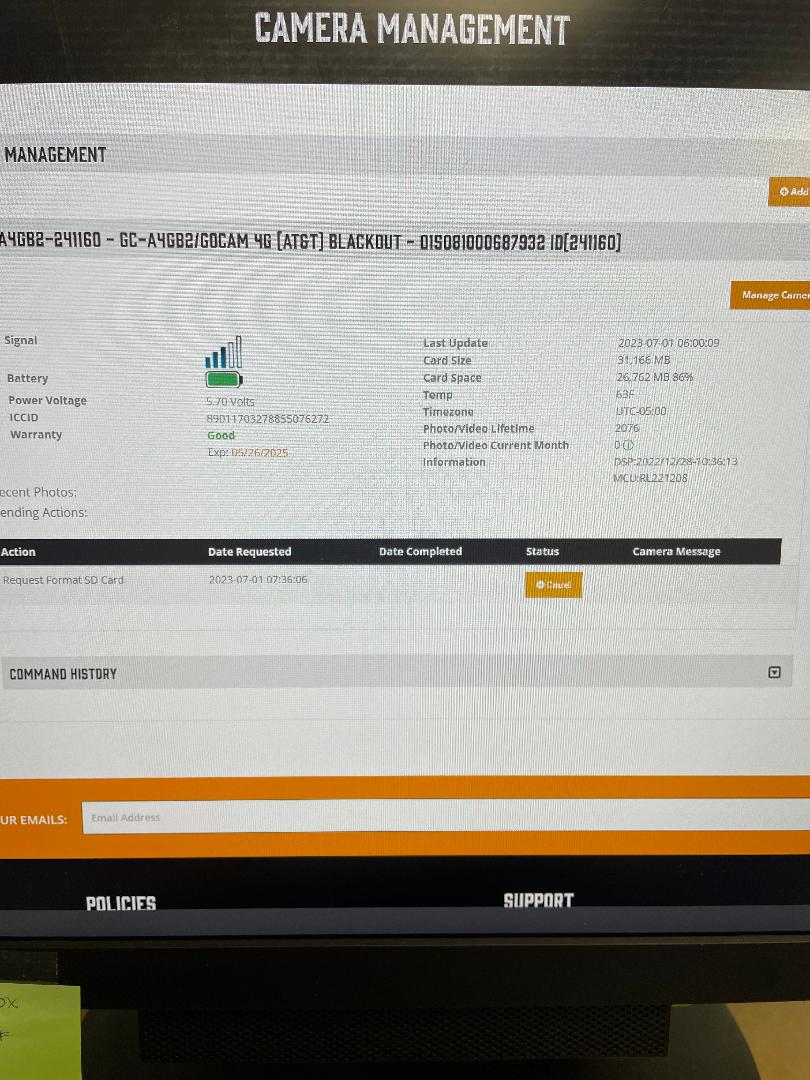
    Yes im getting the reports as i set up, which is 12am which is the default, then 6am, 11am, 4pm and 8pm. The camera is taking pics because i can see the card space go down so i know its still saving pics to the sd card.. 

    i have not set up start times, because i use to do that in the past and i did not like it, but if thats what i have to do then i have no choice.. if i set up a event to send pics will it send all pics that are taking in between those?

    0
    Comment actions Permalink
  • Randall Shapiro

    and set if i want to change settings, that does work as well, the whole camera functions right now minus sending the photos to me..

    0
    Comment actions Permalink
  • John Lockburner

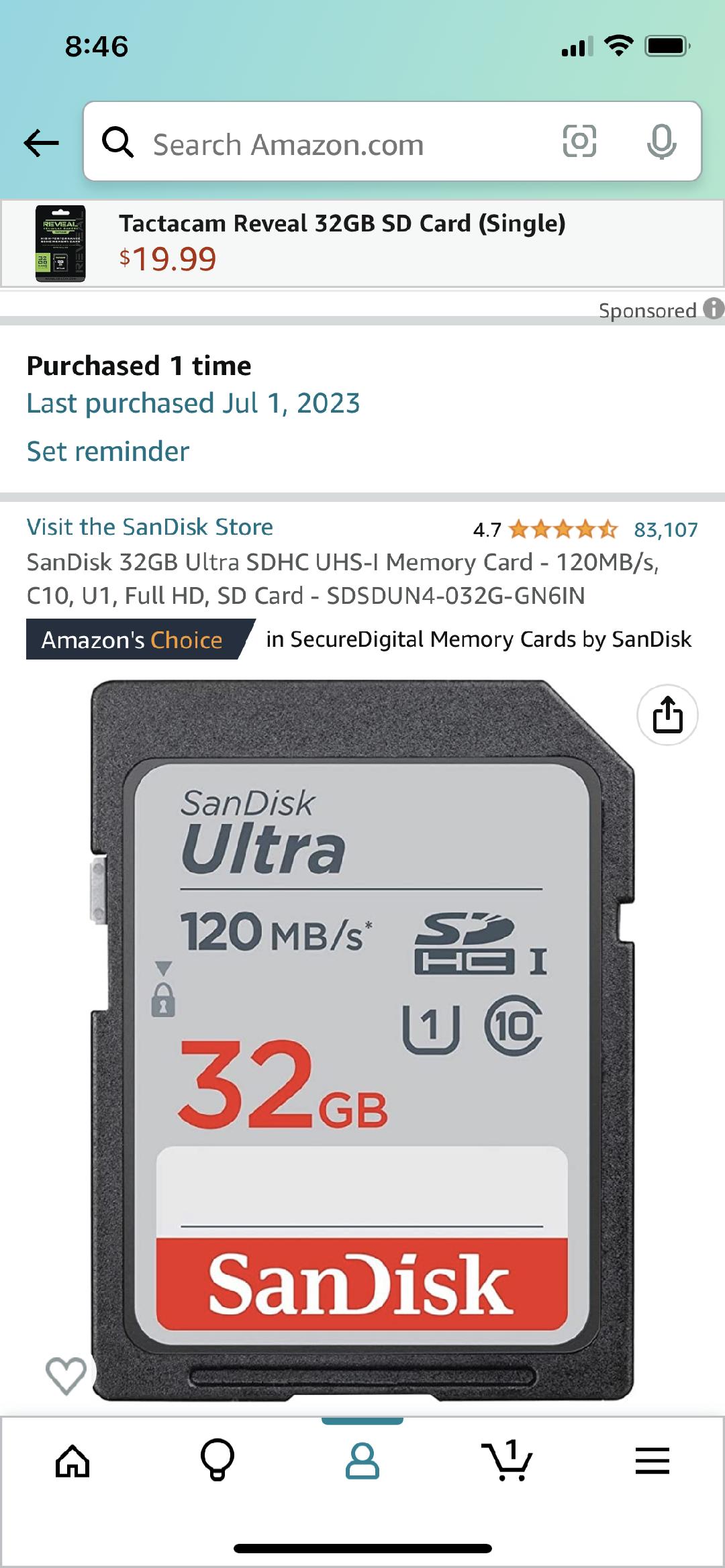
    It really sounds like an SD card issue, can you post a picture or a link to the card that you are using? To post a picture you might need to set your phone to desktop mode in order to see the insert image icon.

    0
    Comment actions Permalink
  • John Lockburner

    Have you checked the online portal to see if the pictures are getting there, my.spartancamera.com ?

    0
    Comment actions Permalink
  • Randall Shapiro

    0
    Comment actions Permalink
  • Randall Shapiro

    0
    Comment actions Permalink
  • Randall Shapiro

    if you think this card is the issue then please let me know what i need to get

    0
    Comment actions Permalink
  • John Lockburner

    Do you have a different card to try? The card could be bad or sometimes those really high speed cards can be iffy. Have you tried defaulting the camera? Did you check the portal?

    0
    Comment actions Permalink
  • John Lockburner

    Do you have any other card to try even if it's not too spec, can't hurt anything to give it a shot. Do you know how to take a manual picture?

    0
    Comment actions Permalink
  • Randall Shapiro

    i wasnt aware you could do a manual pic on the go cam.. as for as set it to default can you do that from the app? my next status report it is going to format the card

    0
    Comment actions Permalink
  • John Lockburner

    The default is only on the camera and so is the manual picture. Turn the camera to set up and once it finds signal press the ok button to take a picture and then press it again to send the picture. Watch what happens and what it says in the screen.

    0
    Comment actions Permalink
  • Randall Shapiro

    yea I'm 4 hours that's the issue and i wanted to make sure i got it figured out before i go set up a new one so i don't run into the same issue . i guess i will see what the format does, and then ill set some times to take pics and if that doesn't work then ill take a new SD card i guess. can you send me a link to the SD card that you use? Also i will let you know if formatting the card works.. next status update is in an hour 

    0
    Comment actions Permalink
  • Cory Williams

    Hello I am having the same issue. It's a new camera and it has signal. I try to take a manual picture and hit the send button then it said setting at the bottom then failed is there anything that will help you?

    0
    Comment actions Permalink
  • John Lockburner

    Cory have you tried going into the cameras menu and defaulting the camera? Is the camera sending status reports?

    0
    Comment actions Permalink
  • Cory Williams

    Other than when I turn the camera on it sends a status report it doesn't send any else

    0
    Comment actions Permalink
  • John Lockburner

    Does it send a status report when you try the manual picture? What camera model?

    0
    Comment actions Permalink
  • Randall Shapiro

    john format card went through and it sent a picture, which is the first one ive gotten since friday morning At midnight when it sends the report.. so maybe that worked. i will change the timed events to take pictures when it allows me, because right now its telling me You can not schedule two events on the same day and hour
    0
    Comment actions Permalink
  • Cory Williams

    No its doesn't send any status report other than when first turning the camera on

    0
    Comment actions Permalink
  • Randall Shapiro

    the f was at the bottom of the picture since it was formatted but i guess at least it sent a picture 

    0
    Comment actions Permalink
  • John Lockburner

    Randall, the F means the format was successful. You can't have two events set up for the same time, maybe you need to cancel them all first and see if it will let you update the settings.

    0
    Comment actions Permalink
  • John Lockburner

    Cory, can you start a new topic so we don't highjack Randall's anymore please. Sounds like we might have to do some more diagnosing. Post a screen shot of the status report from the app when you do.

    0
    Comment actions Permalink
  • Cory Williams

    Ok I will try I have to he away from the camera for a while I'll get back to you when I can! Thank you

    0
    Comment actions Permalink
  • Randall Shapiro

    okay got it, i got it working now. will the camera normally start working after it formats the card and sends a picture?

    i set up 5 times to take a pic

    0
    Comment actions Permalink

Please sign in to leave a comment.