No support call back

i left a message for support to call me back two days ago and no response .. have 4 cameras and pay th3m for a Verizon service that won’t work...
-

How long ago did you leave voice mail? It sometimes takes them a couple of days to return calls.
What model again? There's no 7Gb2, so I'm not sure whether that's an A4Gb, Z4Gb2, or something else.
Can you tell us what is or is not happening? Lots of things can keep a camera from working. No data plan, bad/wrong/unformatted SD card, outdated firmware are very common reasons, just to name a few.
-

GC-Z4Gb2
Are you with Spartan?
Regardless; I bought the data plan set up the camera but when it is switched to the on position nothing happens. I guess I must have missed a step. Was wanting to get the camera up and running last weekend but could not. Now it will be two weeks before I can get it installed.
-
Johnny and I are members of the camera test team, we are not regular Spartan Camera employees. We are decent at regular troubleshooting.
When you switch the camera on, the screen should go dark, the green light on the front should flash a few seconds, and that’s it.
Is the camera on the app? Does it pass the Hello test? (Camera in setup and logged on to the network, fourth tab, scroll down to Diagnostics, Hello test) If it passes the Hello test, the camera has a data connection.
If it’s on the app, you got the registration code.
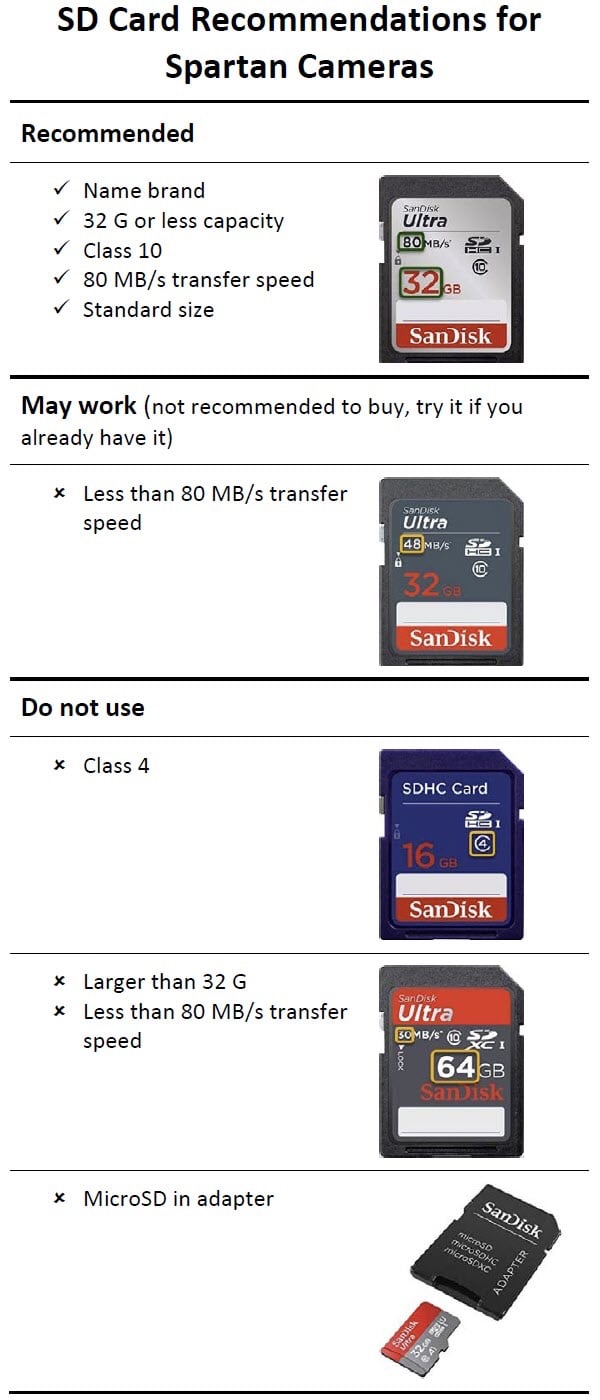
Are you using the right type of SD card, formatted in the camera? See photo below for examples of good and bad cards. To format in the camera, setup mode, Menu, third tab, scroll down to Format.
Is the firmware current? Check the status report page of the app. If there’s an Update button, it needs updating. If it says the FW is current, you’re good.
Will the camera take/send a manual photo? With the camera in setup and on the network, OK to take pic (of anything), OK again to send and watch the screen. It should say something like “setting, sending, sent” and the picture should show up in the app.
-
The last SIM carrier does state a full size SD card up to 32 G but it isn’t specific about class 10 and the speed. I agree that that information should be included.
We’re working on online documentation but it’s not ready yet. I agree that it needs improvement, which is why I’ve started on it, but I’m not the only one who has to work on it and the office staff are busy, busy, busy this time of the year.
-
If you shared the cameras to him, unshare. Instructions are in this article:
If you gave him your account login, you have a problem. Log in to your account and change the password. He will have access for a few days until the app requires a log in and he will no longer have the password.
Liz
P.S. In the future, please create a new post when your question is a new question. Your question is not at all related to this particular topic.
-

On the app go to account and shared camera management and then tap on the camera you need to remove him from. You should then see his name. Press on his mane and slide while pressing and delete should show up, just hit the delete button to remove him. You can also tap on his name and change his access from admin to guest if you want to, then he can only look at pictures and not make any changes.


Please sign in to leave a comment.
Comments
14 comments