GC-G4Gb not sending pictures

I have a new GoCam Ghost Verizon with an unlimited data plan. The camera was setup last Saturday in a location(6 hours away from my current location) with 4 bars of signal and Energizer lithium batteries. It sent pictures fine for the first couple of days but I was getting so many pics, so often that I was afraid the batteries wouldn't last. I went through a couple of iterations of batch sending to see what would work best. The updates to the batch schedules worked fine and pictures came as they should. I decided to make one last update and add another batch send in the morning but that update request just sat in pending status for almost a full day. I cancelled the update request and tried again, hoping the regular nightly 12am check-in would pick it up but it did not so I cancelled that request as well. When I cancelled the request, pictures continued to flow on the last set of batch schedules that I was able to actually upload to the camera. I decided to just remove all the batches and go back to receiving pictures as they are taken if I could just get the update to work again. I cleared out all the batch sends and tried to send an update again, no luck, the request sat in pending even after the 12am check-in. I tried that a couple of times and it appeared that it wasn't sending the update. Well, I go in yesterday and check my settings on the app and portal and somehow one of my cancelled requests must have actually went through even though it showed pending because all the batches are cleared and the camera should be sending pics as they are taken. It was not.
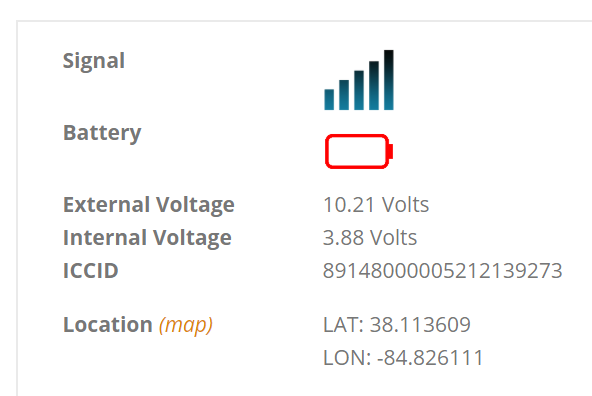
I checked these forums and the general opinion, when things go south, is to update the firmware. I checked and I was on a version from 7/24 and the latest came out on 9/4. So, last night just before 12am, I went into the portal and updated the firmware. It was successful. However, now when I look at the portal and the app, my battery is red and appears to be completely dead. That's impossible so I assume it's something caused by the firmware update. The batteries were completely full right before I did the update. So, now I have the latest firmware, four bars of signal, 12 very healthy batteries and no pictures coming from the camera that is 6 hours away.
Can anyone help?
-
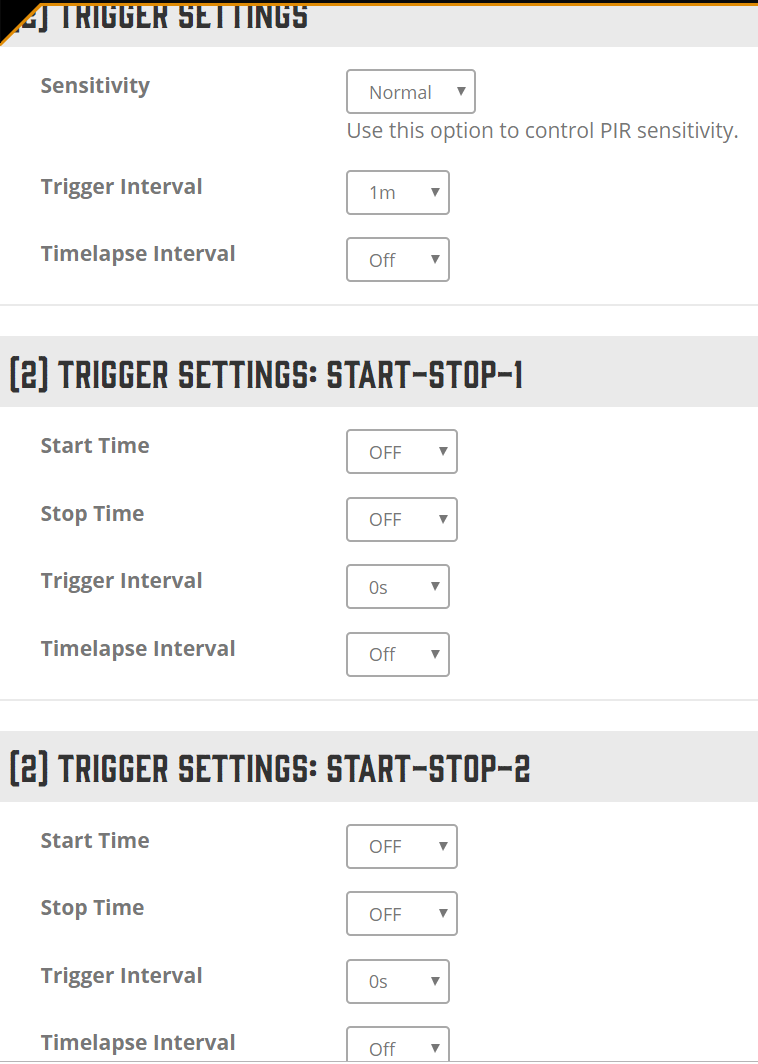
Another twist in the situation. I just got a batch of pics from the camera at 10am. It makes no sense because I don't have any batches setup right now in my Camera Settings screen and even before, when I did, I had batches at 8am and 9am also but I didn't get pics this morning at those times, but they randomly came at 10.
-

Here's what's happening with that red dead battery symbol, because you have lithium batteries in the camera it throws off the battery meter which is calculated for alkaline batteries. Alkaline batteries new are 1.55-1.65 volts, so 6 of them would be 9.6 volts (using 1.6 volt average X's 6) for new alkaline, because of the higher voltage of the lithiums it's above the full limit for alkaline batteries and the camera thinks it's running on a 12 volt external SLA battery, Since the actual voltage is 10.21 volts according to the app the camera thinks the 12v battery is dead. What will happen is that once the lithium batteries drop a little more in voltage it will start showing full power. Right now your lithium batteries are 1.70 volts each.
-
I checked the scheduled events section again and there are no batches setup. All are set to not used and 00 time of day except the first event that is always set to 12am for the check-in. I will request an update and follow up on here with where that goes.
2 questions:
1. How long should it take for an update to complete?
2. With lithium batteries about how many pics should I expect to get with the camera set to send pics when taken?

Please sign in to leave a comment.
Comments
15 comments