Cant blow up pics in app

-
John,
Sorry just now seeing this. App permissions are all set right, tried restarting my phone, deleting app & reinstalling it, etc. with no change. The other cams (not on my account) will download for the most part, but not all images are viewable either.
I did log in on my computer & verify the images are there & can be viewed/blown up on a pc without any problem.
I've also noticed that my most recent pic uploads from last night aren't showing via app anymore (but are there when logged into account)?
Don't know if it helps or gives any insight, but signal is 3 out of 5 bars & battery voltage is currently 5.10 volts & it's a GC-ATTxb/GoCam
If I manage to get off work before dark today I'm gonna hike out to the camera & check it physically too just in case something funky is going on there causing the problem. -
I don't use cloud storage.
I tried to download the pics from my camera again about 15 min ago & they aren't downloading to my phones photo gallery or showing in quickpic either. If I select any single picture to send electronically I'm getting an error message also.
It's not a massive ordeal for me just an annoyance really. If I can access via computer to view them in larger sizes I can definitely make due. May be a random glitch that fixes itself too.
I do have to say, y'all don't play when it comes to support, some of the fastest responses I've had with any support related inquiries overall! Kudos for that! -

Can you please explain exactly what you mean/are doing when you "download the pics from my camera again" or "select any single picture to send electronically".
You can't redownload pics from the app and you can't send pics to the app, although you can from the app. If you'll describe exactly what you are doing, that may help.
I know you've said you uninstalled and reinstalled the app, but consider first clearing both the cache and the data, then uninstalling and reinstalling the app. There are some electronic cobwebs in there somewhere that are messing things up tremendously.
-
When on the main home page, when I click on the dropdown bar & from there I can select to download photos.
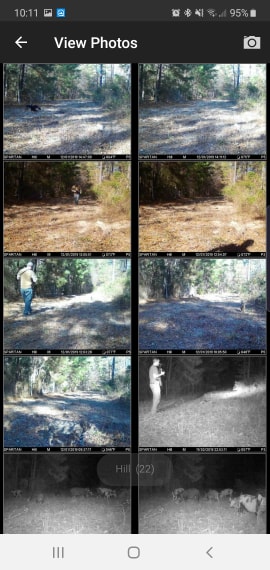
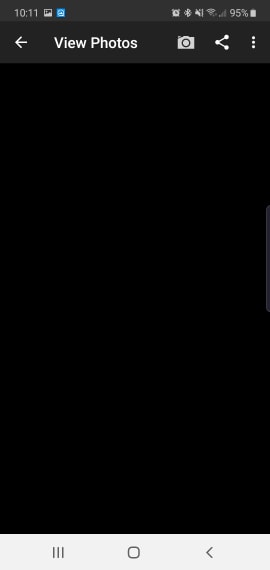
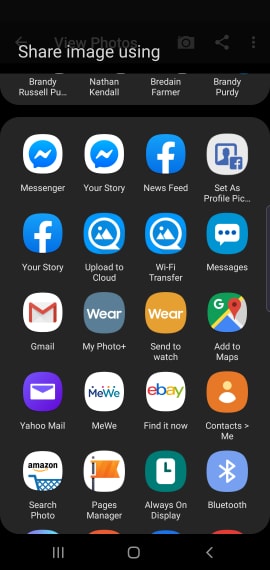
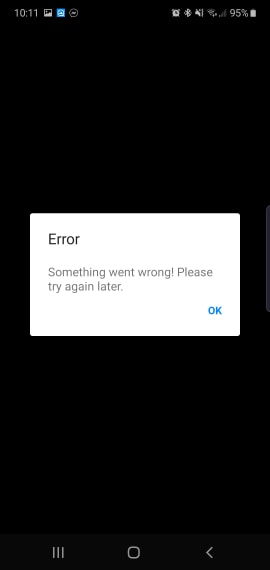
When in the view photos screen of the app, when clicking on any thumbnail to view a larger image I get a solid black screen but the info is shown @ top of the screen & I can click the funky < symbol to share the image (ie, send to myself via FB messenger) and get an error notice saying "something went wrong please try again later".
Since I"m on a computer today I was able to do screen grabs to help "show" better what I"m referring to. I kept them in proper order so they aren't all out of whack & hope it helps?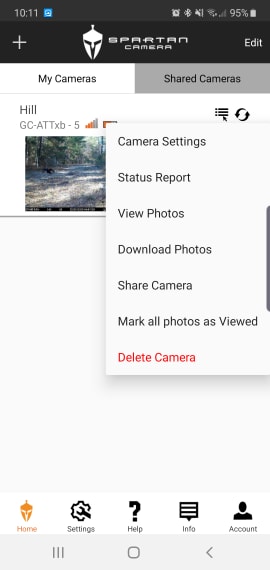
-

The download photos is for if you have auto download turned off, it's not going to download previously downloaded images. To me it really sounds like a permissions issue or possibly something screwy with the purge setting. Maybe try changing the purge to 20 or 25 days and see if that makes a difference. Can you see the pictures in your phones photo gallery? They should be in a folder there somewhere.
-
Thanks for posting those screen shots. That helps a lot. I don't know why you can't post screen shots directly from an Android device here, but you can't and it's darned inconvenient. You can from an iPad.
Okay, "Download Photos" is to be used if in the app Settings, you have Automatically Download turned OFF. It is not to download pictures if that setting is ON nor is it to redownload pictures.
Trying to share an image that isn't there should result in an error. Do you get that when you have an actual photo displayed?
-
Thanks for the clarification on the download photo thing (now I feel really dumb on that side of things!).
The pictures still don't show in my phones photo gallery at all, will try changing around just in case also.
None of my photos will display beyond the thumbnail images via app. All of them will go to full "black" screen when selected.
What is somewhat "odd" to me is that when viewing pictures older than a day or two old on cameras that are shared (not mine) I have the same issue.
I'll try clearing the cache and data & then reinstalling the app to see if it helps or fixes any issue. -
Try it in this exact order, uninstall the app and then reinstall it. Then make sure you go into the settings for the phone, to apps and then to the Spartan app, from there clear the cache and then clear the data. The order this is done can make a difference.
It's not odd at all to me that shared and your cameras have the same problem, it's something with your phone/app not the cameras themselves.
-
I've said it before.. Y'all are awesome.
I'd say I was doing things in the wrong sequence & that was causing the issue. I did it in the sequence you recommended (did restart after clearing cache, no data to clear though).
Once I was able to get logged back into the app everything uploaded (including pics I didn't realize I had) & seems to be working properly.
Can't say thank y'all enough & feel free to stick my "issue" on the wall of shame as an example of what "not to do"!.
-
That’s excellent news! We don’t have a wall of shame :). Well, if you try to set up a camera and send pictures without buying a data plan or having an SD card in the camera, we might wish we had one, but there are so many things that can be just a little “off”. It’s always a relief when there’s a logical explanation and the problem is relatively easy (albeit time consuming and frustrating/annoying) to fix.

Please sign in to leave a comment.
Comments
19 comments