Pictures not being sent, but scheduled status updates are current

The last 3 days my camera has not been sending photos, The scheduled status updates are current and battery power is high. Cell signal strong. All firmware is up to date as well. I changed battery battery and turned on and off the camera as well as ejected SD card and reinserted it. Camera boots up as normal but no photos being sent. Plenty of credits as well. Bad time for camera to go on the blink with Maryland's rifle season in full swing. My other camera's are working fine.
-

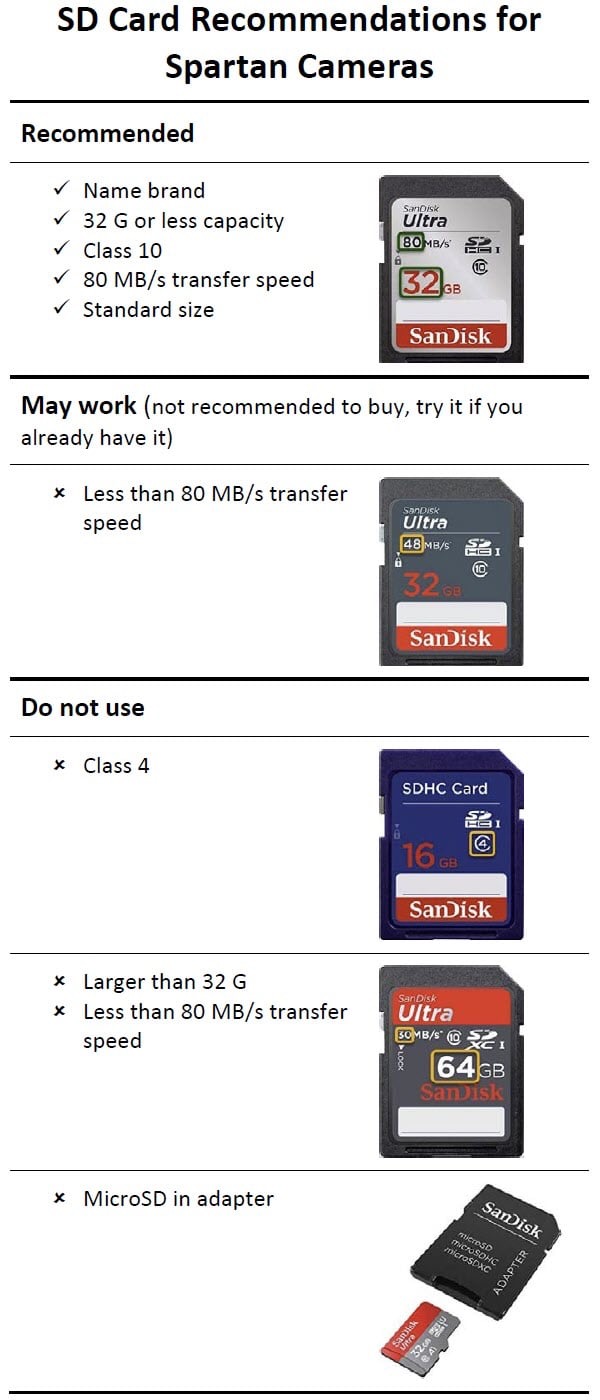
Since you have credits I would lean towards the SD card causing your issues. Did you format the card when you removed and reinstalled it? Even if you did I would still format it through the status report page in the app or go to the camera and do it manually. Is there any chance the SD card is full and overwrite is turned off in the camera settings? What model camera?
-

I just bought a gc-u4gb2 gocam from US Cellular. Service is up to date, and i just bought credits from spartan. When my camera is in setup mode i can take a pic manually and the led flashes to see you are in range of the sensor. When you turn it to on the screen goes blank and no pictures are being taken. My dad left the camera for a couple of hours and then walked in front again and no pictures, but i still get my status update every morning. Im waiting for the camera to connect to the server again to apply the sd format if this doesn't solve the issue whats next? Everything is up to date
-
I can take a picture and send it when in setup mode. Unsure if the pictures are being saved or not. I don't have a way to check that until next weekend. The last status report said i had 62.50 mb available on the card and 0.0 used. Its a 32gb card. I don't remember formatting the card when i first installed it either
-

If formatting the SD card is an option on the app, you need to do that. There is something wrong with that card because 62.5 MB is almost nothing. (This looks suspiciously familiar. Have you asked for help elsewhere? Or maybe someone has this identical problem. I’m pretty sure that I’ve seen this peculiar set of numbers for SD card and recommended formatting the SD card.)
Please sign in to leave a comment.
Comments
15 comments