Staatus of Camera not showing in App

Comments

24 comments

  • John Lockburner

    Do you have the time zone set in the camera settings on the app? You can also try requesting a status report and see if it updates on the next picture. What is the camera model?

    0
    Comment actions Permalink
  • LANCE PHILLIPS

    Spartan Go Cam. I just set the time zone to see if that would work. The other 3 were working without it being set if I remember correctly. I set them from the app and they we’re showing battery and signal strength several days ago. I’ll see if that works, it’s sending deer right now.

    0
    Comment actions Permalink
  • John Lockburner

    They are all GoCams, what is the specific model, GC-?????

    0
    Comment actions Permalink
  • LANCE PHILLIPS

    GCC Att-B

    0
    Comment actions Permalink
  • Elizabeth Swoope

    That is an old model camera that only updates the status report when you request a status report or have a scheduled status report event (like the default event 1 at midnight). 

    0
    Comment actions Permalink
  • LANCE PHILLIPS

    I requested an update. I’ll see what it does

    0
    Comment actions Permalink
  • John Lockburner

    Lance, what models are your other GoCams?

    0
    Comment actions Permalink
  • LANCE PHILLIPS

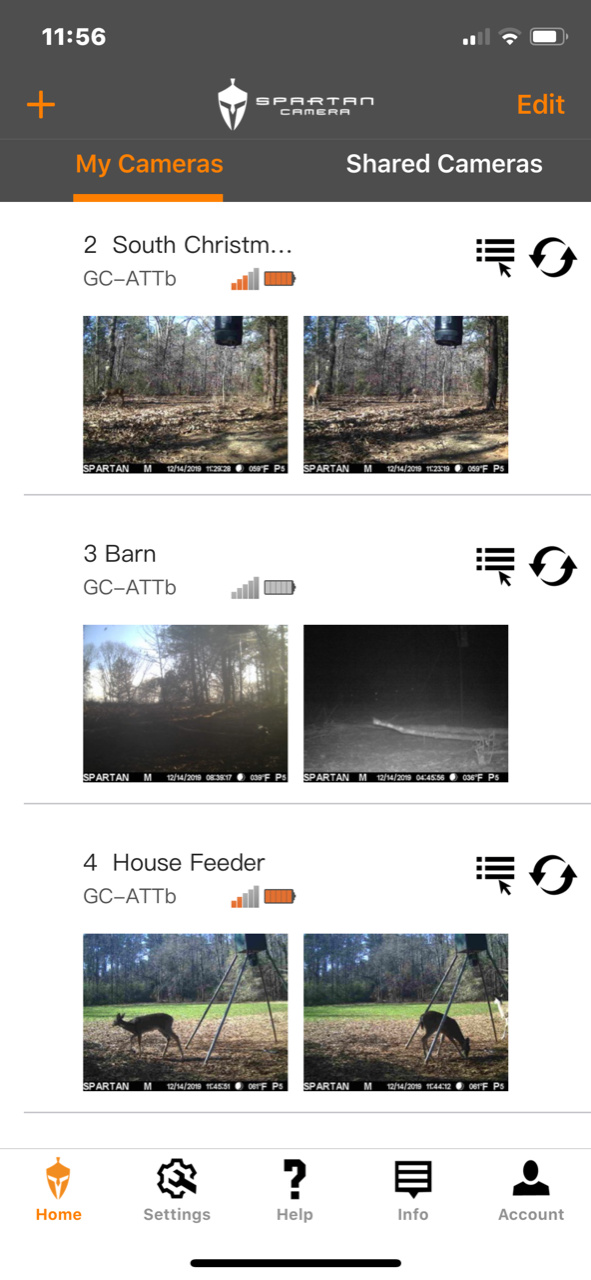
    They are all the same . The update didn’t work. Wished I could attach a pic to show you what it looks like. As long as the camera is sending pics to the app I guess it’s not that bad. I’d just like to see battery life, not worried about signal.

    0
    Comment actions Permalink
  • John Lockburner

    Does the status report you requested show as complete in the camera management section, it's under the status report. Is the firmware current on the camera? You can also try refreshing the status report page on the app. If you log into the online portal is the status report updating there?

    0
    Comment actions Permalink
  • LANCE PHILLIPS

    It does show the status report complete when I change the settings and the firmware is updated. I logged in on the computer and it shows to be updated there too

    0
    Comment actions Permalink
  • John Lockburner

    If you use a desktop to access this forum you should be able to attach a photo

    0
    Comment actions Permalink
  • LANCE PHILLIPS

    0
    Comment actions Permalink
  • John Lockburner

    Thank you, that is very strange. You say on the online portal it shows the correct voltage and signal?

    0
    Comment actions Permalink
  • LANCE PHILLIPS

    It doesn’t show it on the online portal either. Went to check on the camera and do the diagnostic tests, the camera sad it was busy. It started downloading something on the screen and got to 66 out of 74 and failed. It did it 3 times but it is still sending pics to the portal.

    0
    Comment actions Permalink
  • Elizabeth Swoope

    That sounds like it was doing a firmware update. Is the firmware current? Have you requested a firmware update?

    0
    Comment actions Permalink
  • John Lockburner

    Or it could be sending an HD image. Look at camera management on the portal and cancel any pending commands that you have. Then request a status report and then make the camera take a picture.

    0
    Comment actions Permalink
  • LANCE PHILLIPS

    It was doing a firmware update, I had tried it earlier to see if that would fix it.  I cancelled it, but not sure how to make it take a picture from the portal. I did a status report also, for some reason none of the cameras are sending that it more.  They are all scheduled to do that at noon.  If it doesnt get fixed its not a big deal.  Im still getting pics which is the main thing.  I can check cameras for batteries every few weeks.


    0
    Comment actions Permalink
  • Elizabeth Swoope

    Manual photo: camera in setup, on the network. Point it at something, press OK to take pic, OK again to sent pic.

    Here's a link to the page where you can download the firmware file to an SD card and update the FW manually. The instructions are toward the bottom of the page.

    https://my.spartancamera.com/download

    0
    Comment actions Permalink
  • LANCE PHILLIPS

    10-4, I did that a little while ago and took a few pictures before I left the camera. I thought there was a way to do it from the app that I didn’t know about. When I go back to the camera I will update with the SD. Thank y’all for the help!

    0
    Comment actions Permalink
  • Elizabeth Swoope

    If you are running the camera with real time on, you can take a picture now from the app. It should be in the menu with the other commands for the camera.

    I hope you're able to get it all sorted out. I am still running some ATTb that were deployed in August and December of 2015 and I'm hoping to run the oldest one until there's no longer 3G support. I'm in the process of upgrading most of what I have to 4G cameras now since I can't be sure when 3G support will actually end. I'm hoping it won't be until the end of next year, but my cameras are in a very rural area so anything is possible.

    0
    Comment actions Permalink
  • LANCE PHILLIPS

    The camera just sent me a status report and its showing the battery strength and signal now. Not sure what did it, I haven’t been back to the camera to update firmware. Thanks for all the help. Rednecks and technology don’t go together to well. Thanks for the help, I do hope they last a while!

    0
    Comment actions Permalink
  • Elizabeth Swoope

    I come from a long line of rednecks :). A few of us are technologically inclined.

    Who knows what happened, but it's good that it's working. Does the app show the firmware current or needing an update? If it does show that it needs an update, you may just want to do it manually just to be sure.
    0
    Comment actions Permalink
  • LANCE PHILLIPS

    It needs an update. I’m going to carry and SD card next time and update it. Not sure why it isn’t, I thought I had done all of them at the same time.

    0
    Comment actions Permalink
  • John Lockburner

    You may have requested it and it just didn't go through

    0
    Comment actions Permalink

Please sign in to leave a comment.