Camera stopped sending status report at midnight and stopped sending pictures.

Comments

13 comments

  • John Lockburner

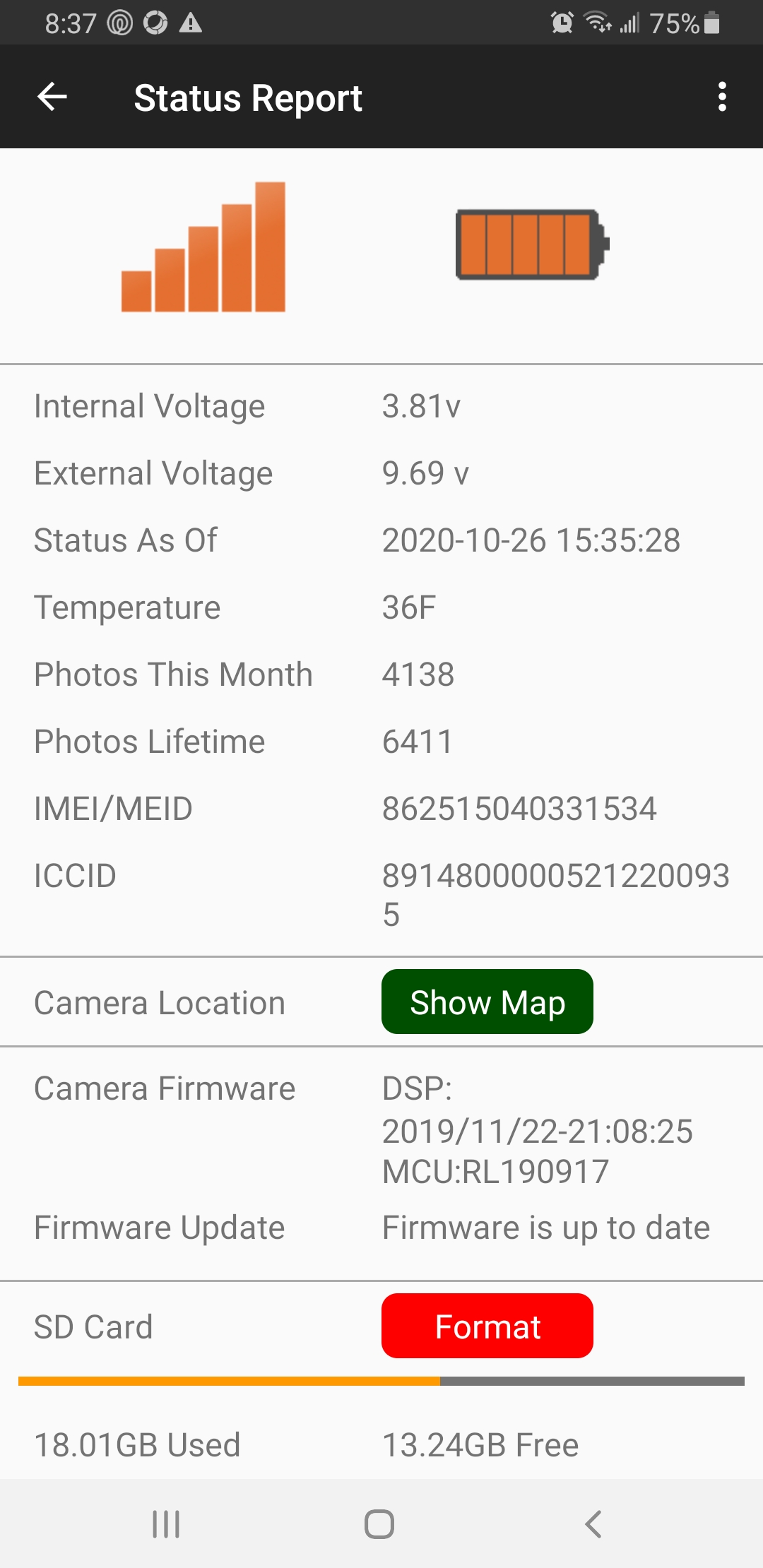
    Can you post a screen shot of the last status report please, you may need to change your phone to desktop mode to see the insert image icon. Once we get this working again you may want to try photo + video, where it sends you the picture and then you request the video if you want to see it.

    0
    Comment actions Permalink
  • Joshua Lull

    0
    Comment actions Permalink
  • John Lockburner

    What are you using for batteries/power? Any chance that person can go to the camera again? Did you get a picture or video yesterday at 3:35pm?

    0
    Comment actions Permalink
  • Joshua Lull

    I did not get a picture or video yesterday.  I just sent text asking for type of battery... if they can't remember the actual brand/type; what do you recommend they put into the camera?

    0
    Comment actions Permalink
  • John Lockburner

    I like lithium the best, I was just asking the type so I could figure things out based off of the voltage showing on the report. When they get there they can turn the camera off and then back on, once it finds signal they can press the OK button to take a picture and then press it again to send the picture. Watch what it says on the screen, it may say sent or may give an error.

    0
    Comment actions Permalink
  • Joshua Lull

    Copy.  It may take a day or so before I get someone back out to the camera.  I will respond back with findings after they've completed the steps above.

    0
    Comment actions Permalink
  • John Lockburner

    In the mean time I would cancel any pending commands and request an SD card format. Can't hurt and if the card is the problem it may get things going again if the camera decides to check in. It will delete anything on the card though if that matters to you.

    0
    Comment actions Permalink
  • Joshua Lull

    I have sent a request to format... I will respond when it is complete.

    0
    Comment actions Permalink
  • Joshua Lull

    The steps were followed but after saying ok to send picture nothing showed on the screen as error or that it was sent.  The screen went back to the picture that was taken.

    0
    Comment actions Permalink
  • Joshua Lull

    When the camera was turned off and then back on, the camera says that it is reconnecting to network and then after initializing there are 5 bars for the connection.  However, I have not received the picture that was sent.  I cancelled the format request from earlier because it was still pending...

    0
    Comment actions Permalink
  • Joshua Lull

    I am now receiving status reports that I'm requesting but no pictures.

    0
    Comment actions Permalink
  • John Lockburner

    It sounds like probably an SD card issue. You can format in the cameras menu and I would even default the camera in it's menu. Changing to a new to spec SD might be a a good idea. Do you know the specs on the card that's in it?

    0
    Comment actions Permalink
  • Joshua Lull

    We completed all of the above and I was able to receive a manual photo afterwards.  We will leave it inside through the night where some domestic animals can walk around it to make sure it works properly.  I will respond back if it seems to not be working tomorrow morning, but for now, I think the issue is resolved.  Thank you very much for your help!
    0
    Comment actions Permalink

Please sign in to leave a comment.