GC-Z4Gb2 not sending photos

Comments

17 comments

  • Elizabeth Swoope

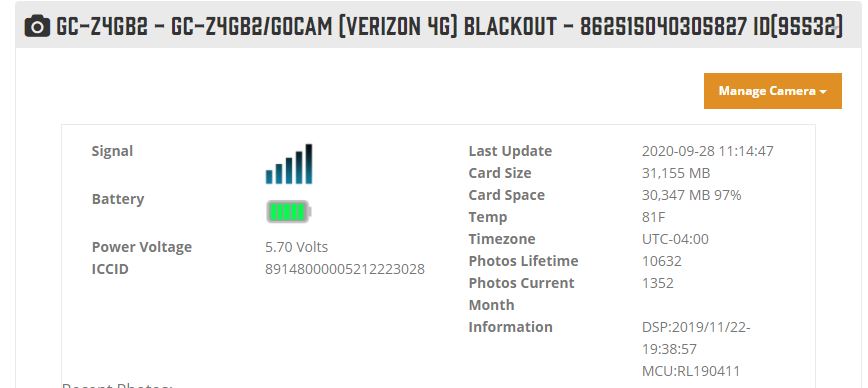
    Can you post a picture of the status report from the app and a picture of the SD card, please? Is the camera not taking pictures or taking them but not sending them?

    Here’s how to post pictures to the forum from your phone.

    https://support.spartancamera.com/hc/en-us/articles/360041970993-How-to-post-pictures-screen-shots-from-your-phone-to-the-Support-Forum

    0
    Comment actions Permalink
  • John Lockburner

    Your SD card may have gone bad, it does happen sometimes. You may want to try replacing it with another to spec card that's 32gb or smaller, class 10, 80mb/s or faster and a full sized card (not a micro in an adapter).

    0
    Comment actions Permalink
  • Travis Stepps

    Seems seems this is more of a camera problem rather than an SD card. I have been having to reformat my 3rd SD card to get it to send pics. I reformat it it sends 3 to 6 pics with no problem and then stops again. Does Spartan sell the SD card that will work because I have the exact card you recommend and STILL deal with this issue.

    0
    Comment actions Permalink
  • Elizabeth Swoope

    Travis, would you please start your own post so your info doesn’t get mixed up with Steven’s. You have similar problems but the solutions may be different.

    Please post screen shots of the status report from the app and of your settings. Let’s see if there’s anything unusual.

    -1
    Comment actions Permalink
  • Steven Ramage

    See below for status report. As for the memory card, I don't have a pic of it. It's in the woods, but as you can see this cam has taken quite a few pics all with the same card.

    Update for today: the cam seems to be taking sporadic pictures. I have a daily scheduled event for 12:00 noon to take a pic, but it has not been doing this in several days since my reset. This leads me to think it is not capturing everything.
     

    0
    Comment actions Permalink
  • John Lockburner

    Steven did you update the settings after you reset/defaulted the camera? You can look at the picture numbers on the portal to see if there's any gaps in the picture sequence

    0
    Comment actions Permalink
  • Steven Ramage

    Yes, I have updated the settings from the app a few times and there are multiple gaps in the numbering sequence. I skip from 170 to 178 to 198 to 200 just since 4:00 this am...

    0
    Comment actions Permalink
  • John Lockburner

    I would try the format and go from there. The last format that you did was it on the camera or remote from the app?

    0
    Comment actions Permalink
  • Steven Ramage

    I did it from the camera.

    0
    Comment actions Permalink
  • John Lockburner

    I would keep trying until you can get to the camera or it sends the picture with an F on the info strip, just because the command is sent doesn't always mean it executes.

    0
    Comment actions Permalink
  • Steven Ramage

    I'm not sure I understand. The last format was done AT the camera. I have done it from the camera and app a couple of times and continue to have issues. Are you suggesting to try reformatting from the app again? How do I know it's successful and I am getting all of my pictures going forward?

    0
    Comment actions Permalink
  • John Lockburner

    Sorry, I misread your last post. Yes, I was suggesting you format from the camera again, it can't hurt to try until you can get to the camera to do some more troubleshooting or it starts working again. Gaps like that can also be signal related or there's a few other things that can cause it.

    0
    Comment actions Permalink
  • Steven Ramage

    Something definitely is funky. This cam has taken close to 11k pictures from the same tree, with the same memory card, since I bought it less than a year ago. Only change recently was adding lithium batteries as I was using regular alkaline batteries prior. I run multiple Spartans and haven't ever had many issues until the last couple of months. 

    0
    Comment actions Permalink
  • John Lockburner

    I agree something is off, any chance the antenna got damaged?

    0
    Comment actions Permalink
  • Steven Ramage

    Antenna is still good. I removed, inspected and reinstalled when I reset.

    0
    Comment actions Permalink
  • John Lockburner

    When you see a status report sent at a non scheduled time that usually means the camera took a picture but it didn't/couldn't send. Most times it's the SD card but you usually don't get some and not some others. It still could be the SD card even though it' been working since you got the camera, sometimes they just go bad. If you want to email me your log in information I can take a look and see if anything looks out of place. My email is johnny.lockburner@spartancamera.com

    0
    Comment actions Permalink
  • Steven Ramage

    Email sent. Thanks!

    0
    Comment actions Permalink

Please sign in to leave a comment.