Not sending status updates

Comments

18 comments

  • John Lockburner

    What is your camera model? Did your settings update happen or is it still showing as pending?

    0
    Comment actions Permalink
  • Elwin Page

    The update happen. 866834040253994

    0
    Comment actions Permalink
  • John Lockburner

    The camera model is GC-???? or possibly it starts with a W or just G. Can you post a picture of your last status report? If posting from your phone you will most likely have to change to desktop view to see the insert image icon.

    0
    Comment actions Permalink
  • Elwin Page

    Not sure how to post pictures sorry not very good at this GC-U4Gb2

    0
    Comment actions Permalink
  • John Lockburner

    Have you checked to make sure that you still have premium credits?

    0
    Comment actions Permalink
  • Elwin Page

    Yes I just purchased more Sunday before I put the camera out

    0
    Comment actions Permalink
  • Elizabeth Swoope

    Here’s how to post pictures:

    https://support.spartancamera.com/hc/en-us/articles/360041970993-How-to-post-pictures-screen-shots-from-your-phone-to-the-Support-Forum

    There may be a problem with your SD card. Do you have a picture of it, maybe from online? Did you format it in the camera?

    0
    Comment actions Permalink
  • Elwin Page

    0
    Comment actions Permalink
  • Elwin Page

    Thanks for the tip on how to post 

    0
    Comment actions Permalink
  • Elizabeth Swoope

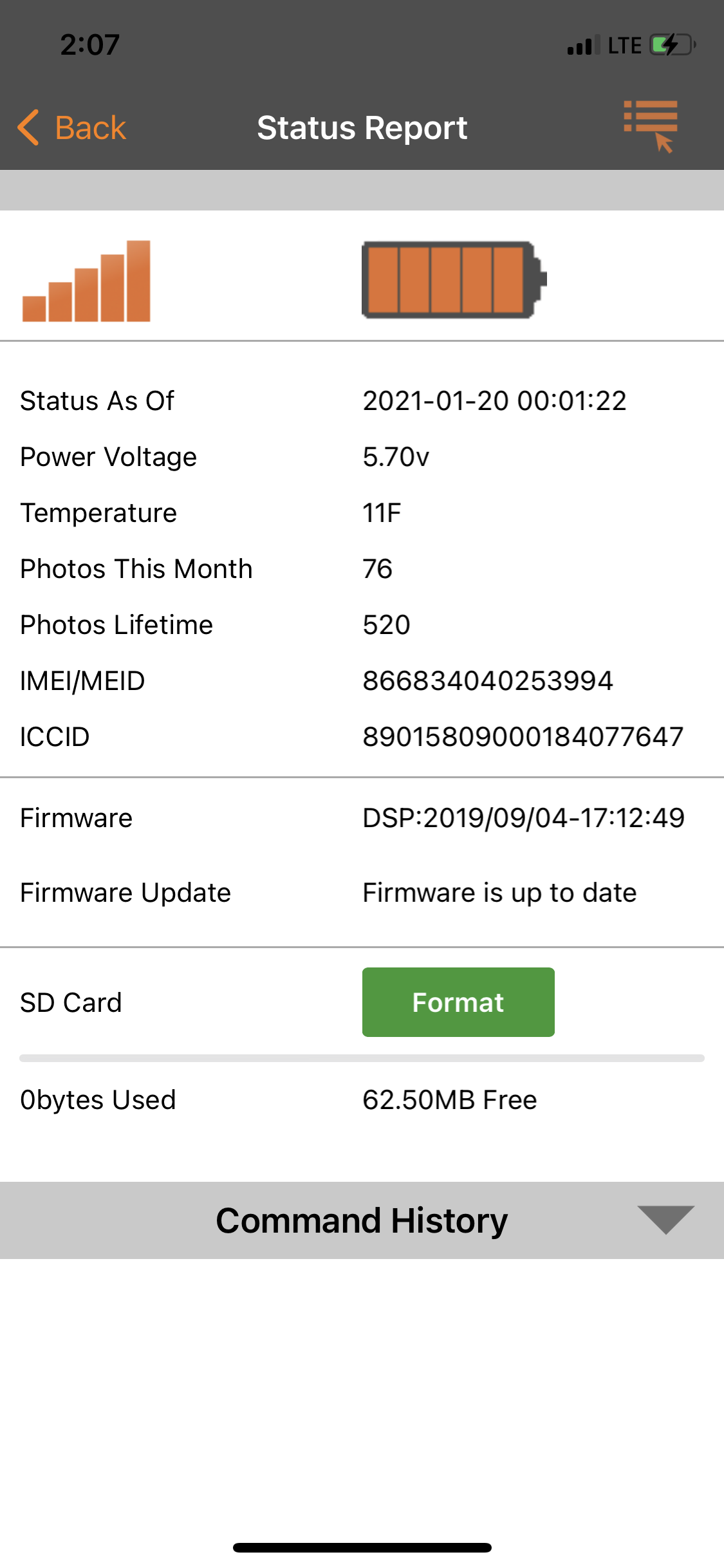
    It’s definitely your SD card. Do you see 0bytes used and 62.50MB free? There is no card with that little capacity.

    https://support.spartancamera.com/hc/en-us/articles/360040555453-SD-card-information-and-recommendations

    0
    Comment actions Permalink
  • Elwin Page

    I’m not good with this stuff do I hit the format button or so I have to be with the camera or do I have to buy a new dd card sucks because it was working great then nothing how’s that happen 

    0
    Comment actions Permalink
  • Elizabeth Swoope

    SD cards cause problems, lots and lots of problems. You can format with the button on the status report but it may or many not work. That SD card is in bad shape. Did you format it when you put it in the camera? Is it “to spec”? 

    How’s that happen? SD cards work until they don’t (just like car batteries or anything else that just suddenly dies for no apparent reason).

    0
    Comment actions Permalink
  • Elwin Page

    When I first setup the camera I did the card is the right one I think but I will try to format the card and pick one up for when I go back up Sunday the new card I will have to format mat also 

    0
    Comment actions Permalink
  • Elizabeth Swoope

    Whenever you put a different SD card in the camera, you want to format it in the camera using the camera menu (not the app, because that’s slower, it’s the same process but it’s just faster to use the camera menu).

    0
    Comment actions Permalink
  • Elwin Page

    Look good deal thanks so much for your help 

    0
    Comment actions Permalink
  • Elwin Page

    Just wanted to say that the format worked I got lucky thanks again

    0
    Comment actions Permalink
  • Elizabeth Swoope

    That’s great news. I’d replace that SD card, though.

    0
    Comment actions Permalink
  • Elwin Page

    I’m going to when I go back down

    0
    Comment actions Permalink

Please sign in to leave a comment.