Camera stopped working now won't turn on

My camera has worked perfectly for the past year. Four days ago it didn't take as many photos even when deliveries were made. (That is where it is focused.) It took only one photo four days ago then nothing. I took it down and now it is off and won't turn on for reset. We had very windy weather when the trouble started, if that helps.
I am currently replaced parts such as batteries and SIM card even though I don't think that is the problem. Any ideas?
-

My camera is doing something similar. The lithium Batteries went dead so I changed them and the SD card. It seemed to work then put it back out. Never took a photo. Figured I needed to send an up date so i sent it from my phone. Took a while but finally went through. Then the ap said the SD card needed to be formatted. Command went through but still not working. Figured I had to request the format from the camera itself. When I got there the screen would not operate. Pulled it again changed the batteries and Tried another SD card. Screen is still not working but a green light continuously flashes now. Any ideas?
-
The light came on today after we left the camera open. We think it might have gotten wet in the blowing rain even though it is in a protective box. Tonight I am trying what you suggest. I took the batteries out and turned the camera to the on position. I'll let you know in the morning, but I am very optimistic. Thanks.
-
John, the camera worked after taking the batteries out and letting it dry. It took a picture while my husband was holding it. When he put it back in place it isn’t taking pictures so I’m thinking it’s an internet problem. I guess I need a troubleshooting checklist to go through. Or would it just take a while after putting it back on the pole mounting?
-

It might take a minute or two depending on your settings. You can default the camera in it's menu and formatting the SD card in the camera can't hurt. Turn the camera off and back to set up, when it finds signal press the OK button to take a picture and then press it again to send the picture. Watch what it says on the screen.
-
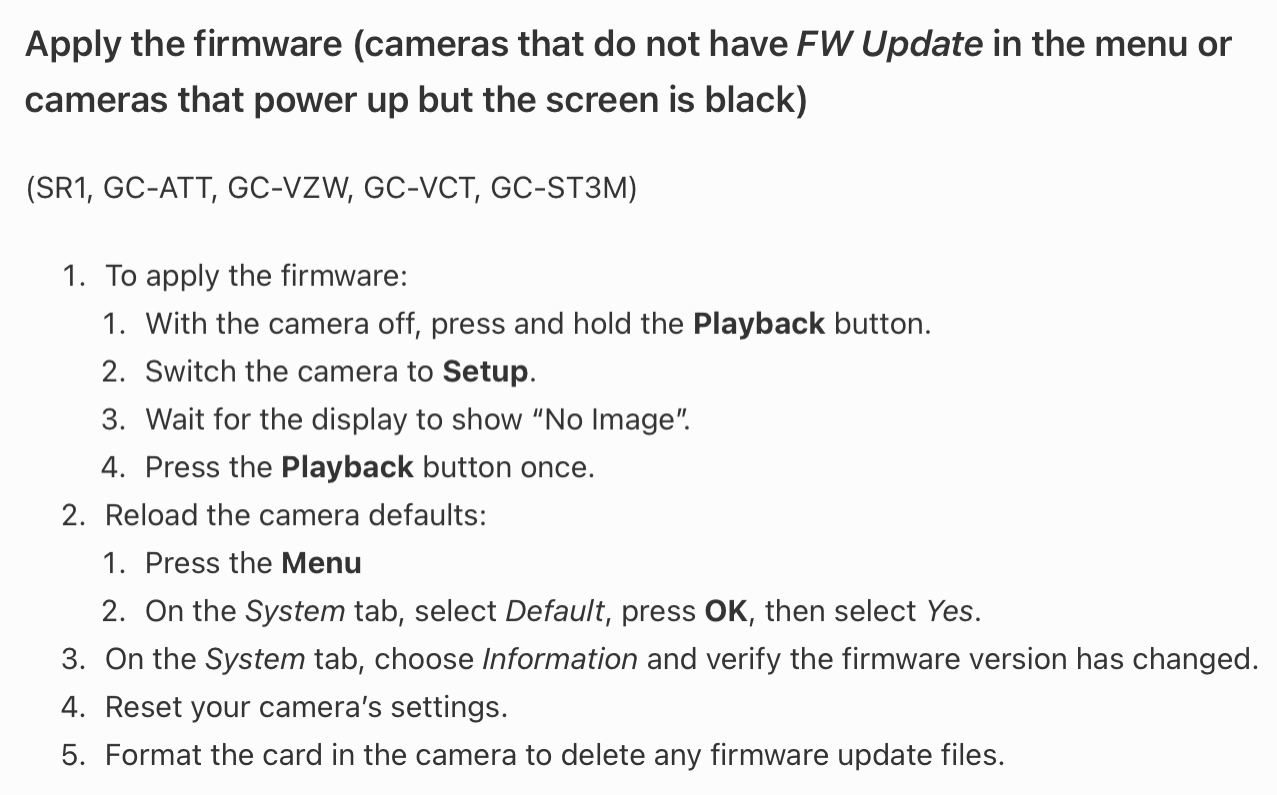
You can do a manual update, follow the instructions for cameras without the update option in the menu. If your beep isn't turned on just hold the playback button for 6 or 7 seconds.
https://my.spartancamera.com/download -
I've downloaded the firmware for the camera model onto a chip and put it into the camera. This is all I get.
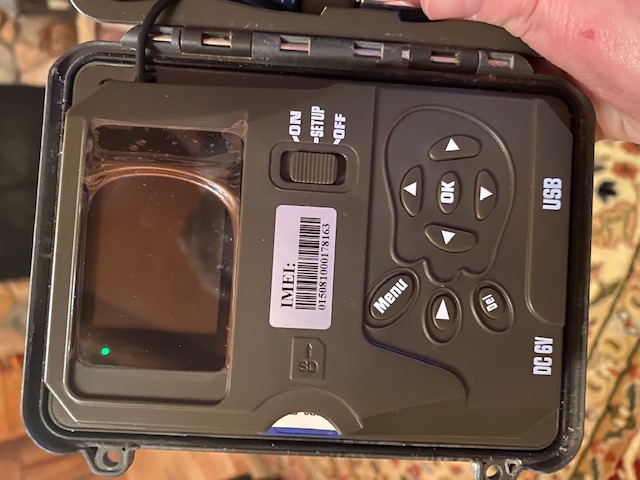
As I said before the screen/display isn't working. I can't navigate any of the menus within the camera to download the firmware. Is there a way to sequence through the menu to update without being able to visually see the menu options? The green light in the upper left hand corner of the screen boarder came on after holding the playback button down and moving the switch to setup. The light on the front of the camera continues to flash green. I've tried this with multiple SD cards and it makes no difference. I've tried with multiple sets of lithium batteries as well. I can't get the display to come on. The original problem seems to be the same as several of your other support posts that it abruptly stopped sending photos. My other spartan camera had the same issues but was able to get that one working with updating the firmware manually. However, this camera was working, stopped again, now the screen/display won't turn on to allow me to manually update the firmware. How do I solve this problem if the screen/display isn't available to navigate the menus to update the firmware?
I have premium credits and subscribe to ATT through Spartan and everything is current until 2021.
-

Andy,
Are you hearing any beeps at all? You may have to hold Playback for a few seconds, release it, and the press it again.
If the camera screen doesn't come back up after this, you'll need to call 770-582-0004 or email support@spartancamera.com.
-
Press/hold the Playback switch, turn the camera to Setup and wait several seconds. Release Playback and press again. Holding it down for any time before turning the switch to Setup doesn't do anything. You're waiting for it to finish booting and then check the SD card (no images on it), then releasing Playback and pressing it to activate the FW update.
-
All I get is the green light in the upper left boarder. I’Be attempted several times holding the button down for “several” seconds (10-60). The release and press again and nothing happens on the scree/display. There are no images on the SD card only the Firmware file downloaded for the CG-A4Gb. I’ve let it sit following the pattern hoping the firmware would update but I’m still getting nothing. Following the sequence and some time I flipped to on. The green light flashes for a bit then stops. No pictures are sending screen/display is still not operating.
-
John, I did everything you said and the camera now works!
What I did:
Removed all batteries, the two cards then the front face of the camera. We used a hair dryer on low to dry everything out.Waited overnight then reset everything.
After all this the camera works just like it did before. My only issue is that I need to look up again how to reset the date and time, but we put the camera back on the pole and it works.
Remember the issue was we had heavy rain and wind. The inner parts of the camera must have gotten wet.
Thanks to everyone. Good luck to you, Andy.
Please sign in to leave a comment.
Comments
32 comments