Camera quit sending pictures and status reports

Comments

35 comments

  • John Lockburner

    It's not even sending the midnight status report? How's the battery power showing?

    0
    Comment actions Permalink
  • Jimmy Starnes

    Hey John.  No it’s not sending anything. Power shows 5.7v.  It’s showing sd card is almost full but it want let me format the sd card


    0
    Comment actions Permalink
  • John Lockburner

    Have you checked to make sure that your data plan is still active?

    0
    Comment actions Permalink
  • Jimmy Starnes

    Yes. I also have another camera on same property that is still sending pics

    0
    Comment actions Permalink
  • John Lockburner

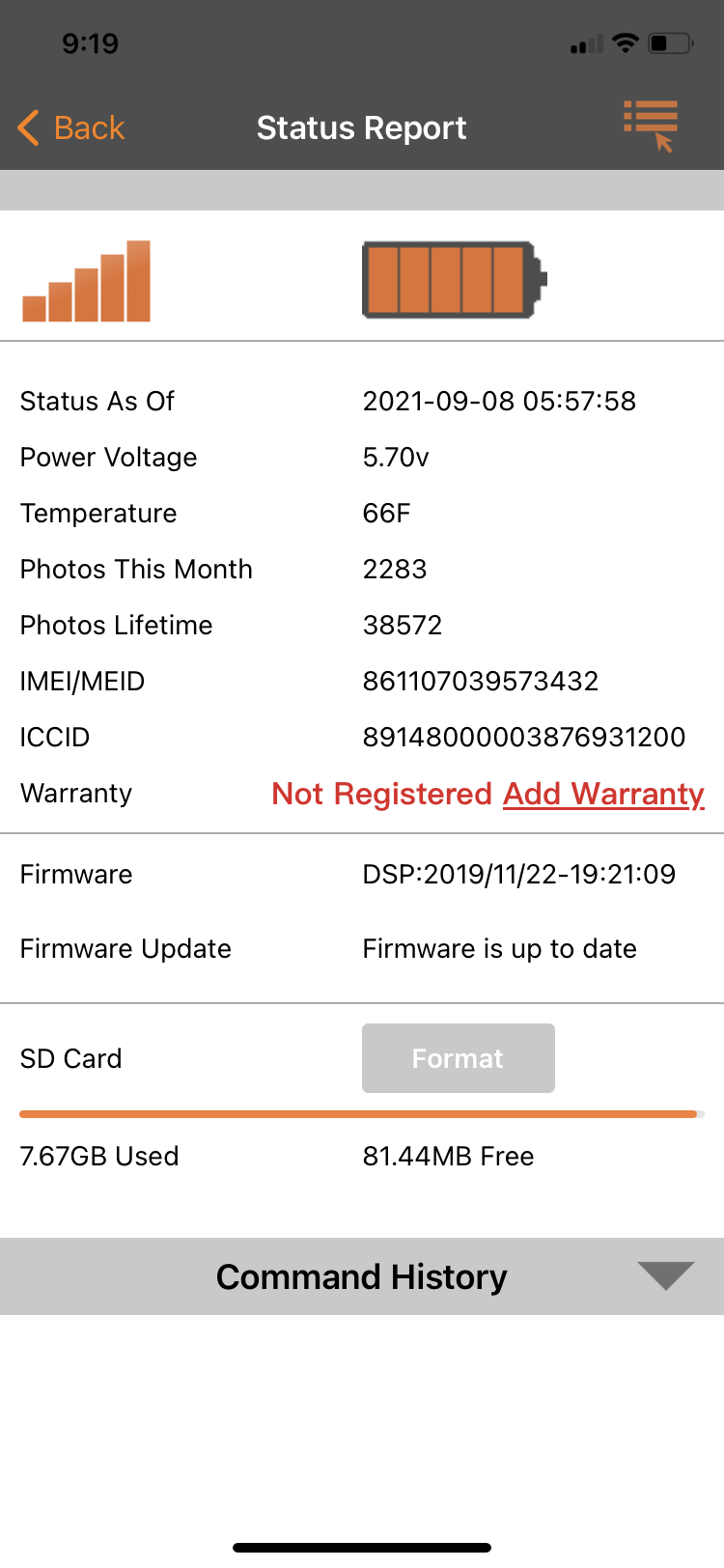
    Can you post a screen shot of your last status report from the app? Include the info from the top all the way to the SD card info at the bottom. You may need to change your phone to desktop view to see the insert image icon to post the pic.

    0
    Comment actions Permalink
  • Jimmy Starnes

    0
    Comment actions Permalink
  • John Lockburner

    I would check and make sure the data plan is still active. Unless it's a Spartan SD card I'm thinking that the SD card might be the issue. There are very few 8gb cards that are to spec (32gb or smaller, class 10, 80mbs or faster and full sized, no micros in adapters. If you have any other pending commands other than the format cancel them. Hopefully the camera will check in and format successfully and fix the problem.

    0
    Comment actions Permalink
  • Jimmy Starnes

    The camera is in another state but I had a friend change sd cards to see if that would fix the problem but it’s still not working! My biggest frustration is this has happened to my Spartan cameras for the past 3 yrs.  At some point during deer season they will quit sending pics! 

    0
    Comment actions Permalink
  • John Lockburner

    Do you know what card he put in it? Did he format it using the cameras menu?

    0
    Comment actions Permalink
  • Jimmy Starnes

    No idea what card they put in it but sure they didn’t format card with camera. The camera did send a status report at midnight last night! Should I try to format card through the app?

    0
    Comment actions Permalink
  • John Lockburner

    Yes, it can't hurt to try

    0
    Comment actions Permalink
  • Jimmy Starnes

    Camera still not sending pics but it will send a status report now! Any suggestions?

    0
    Comment actions Permalink
  • John Lockburner

    Is it sending the status report at just midnight or random times? Can you post a pic of that report please

    0
    Comment actions Permalink
  • Elizabeth Swoope

    Did the format command work? If it did, you should have gotten a pic with F on the info strip. I would try formatting again.

    0
    Comment actions Permalink
  • Jimmy Starnes

    The format did complete but I didn’t get a pic.  I requested a status report and it sent one also

    0
    Comment actions Permalink
  • John Lockburner

    On the bottom of the status report is it showing the card as pretty much empty?

    0
    Comment actions Permalink
  • Elizabeth Swoope

    If the format completed but you did not get the photo with the F on it, you should request the format again.

    0
    Comment actions Permalink
  • Matthew Lape

    I have 2-3 of my 5 do this multiple times a season! Using the same SD card as recommended, go to the camera turn it on and it says no SIM card. I got a new SIM card from spartan for the one, and it worked for like 5-6 months now same camera doing the same thing, no SIM card, for a $310 dollar camera I’m extremely frustrated. For this much money shouldn’t have these continuous problems with them!

    0
    Comment actions Permalink
  • Elizabeth Swoope

    On the SIM, remove it, clean the contacts (use electronics contact cleaner if you have it, rub with a pencil eraser or against your jeans), put a couple of layers of clear tape (e.g. Scotch tape) on the non-contact side, then reseat it. That may do the trick. It usually does on my cameras although I have had to replace SIMs.

    The cameras are out in a hostile environment. It doesn’t surprise me that inexpensive removable components cause problems.

    0
    Comment actions Permalink
  • Nathan Killen

    I'm having the same problem. Last pic and status report was on 9/14 and nothing since. Found this topic while looking for help. Battery life is showing full, signal 5 bars and memory card is less than 1/4 full. Very frustrating when the camera is 2 hours driving plus a 2 hour hike in to reach.....not to mention it's a critical time for trailcam intell.

    0
    Comment actions Permalink
  • Elizabeth Swoope

    Nathan,

    If your camera isn't checking in, there's not much you can do. Is there any chance that the antenna could have gotten damaged or the camera tampered with.

    It's still possible that it's batteries (if lithium) or SD card or SIM. You can hope that it will come back online, but you may not know what has caused the problem until you see the camera. I understand your frustration. My cameras are over 2 hours away, but at least I don't have a hike to get to them.

    0
    Comment actions Permalink
  • Jimmy Starnes

    Yes status report shows 0 used.  Any suggestions? I’m going to where camera is this weekend if you know of anything I can try? Worst part of this situation for me is my cameras work great during off season but I’ve had trouble with them every deer season I’ve had them! Either 3or4 straight years

    0
    Comment actions Permalink
  • Elizabeth Swoope

    Jimmy,

    Your SD card appears to be an 8G card so it’s unlikely to be “to spec”. It may be class 10, but it’s probably either 40 or 48 MB/s and you want 80 MB/s or a little faster. 

    I would get “to spec” SD cards, format in the camera, reset the camera to defaults (which clears a lot of cobwebs). Take/send manual photo, request settings update (to get your settings back), take/send another manual photo (to make that settings change), turn on and walk test until you get a photo or two.

    https://support.spartancamera.com/hc/en-us/articles/360040555453-SD-card-information-and-recommendations

    0
    Comment actions Permalink
  • John Lockburner

    Jimmy, what is the time and the date of the last status report?

    0
    Comment actions Permalink
  • Jimmy Starnes

    Hey John.  It sent a status report at midnight last night. The sad card that’s in the camera now might not be to spec but the one that was in it was! It had been taking and sending pics for a month before it just stopped. The camera is 7 hrs away so I had a local friend change the sd card in hopes it would start back working! My biggest issue is not only that camera is not working but that they do this every year. 
    0
    Comment actions Permalink
  • John Lockburner

    If you are getting data through Verizon directly and not through Spartan have you checked your premium credits?

    0
    Comment actions Permalink
  • Jimmy Starnes

    Hey John.  I just checked credits and it says I have 14 remaining but when I look at history that camera shows credit from 8/11 to 9/11 so that could be problem.  Why wouldn’t it use out of credits I have? How can we fix this?

    0
    Comment actions Permalink
  • Elizabeth Swoope

    It only uses a credit after it sends the first photo after the current credit has expired. Credits aren’t the problem. It hasn’t been able to send a photo to use a credit.

    0
    Comment actions Permalink
  • Nathan Killen

    My camera finally sent a status report last night, first communication since 9/14. So is that a sign its on Verizons side or.....?

    0
    Comment actions Permalink
  • John Lockburner

    Jimmy, did it send another status report at midnight again last night? It should grab a credit after it sends the report. I'm still thinking it's SD card related or simply that the camera just needs to be defaulted.

    0
    Comment actions Permalink

Please sign in to leave a comment.