Spartan Go Live ATT

I re-activated my camera this morning and and got test photo and everything was working great turned it off and left a external battery hooked to it to charge the internal batteries . Come back and changed external battery so I would go to woods with fresh battery and charged internals . got to the woods 2-3 hours later and I could could not get camera to come on . Went back to truck and got volt meter and checked battery and end of plug in , 13.00 volts finally camera will beep and buttons will lite up but screen stays blank and it will not do anything . Any help will be appreciated . Class 3 10 san disk and I tried 2-3 different cards also . Un hooked external battery and put batteries in camera and still same thing .
Thanks Don
-

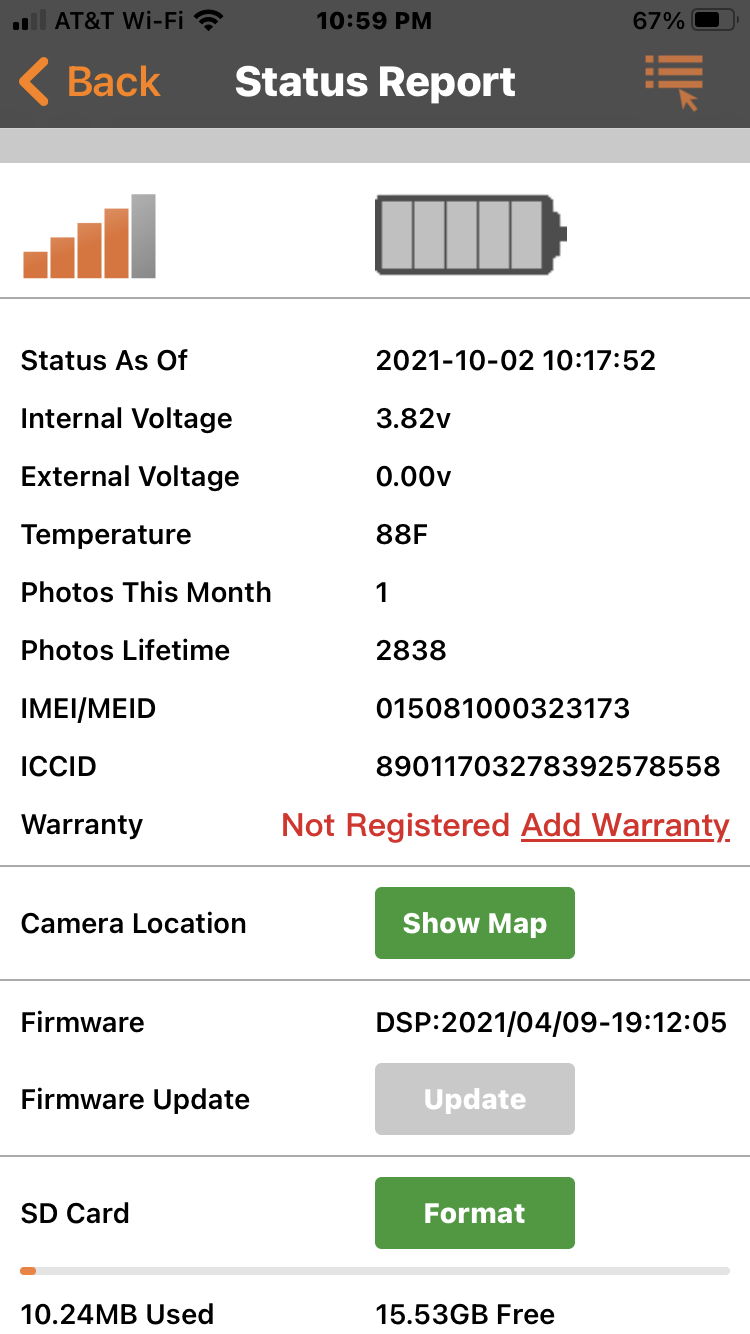
Can you please post a screen shot of the status report from the app, from the signal/battery indicator down through the SD card info. You’ll need to switch to the desktop view to post the screen shot from your phone.
Did you format the SD cards in the camera? Do you mean Class 10 U3 SanDisk? I haven’t had good luck with U3 so I stick to U1.
-
The internal voltage is high enough that the camera should come on and stay on. It’s not showing any external power, though. Do you have another U1, 80 MB/sec or a little faster that you can try? This sort of problem is often SD card related.
For now, I would cancel the FW update. Get the camera up first. If you have it at home (where you have a computer), I would consider doing a manual FW update, but I would try OTA first with camera in hand. Not until I took/sent a couple of manual photos first, though. Then I’d request FW update and take/send manual photo t trigger the update.
-

Try it with no SD card in the slot and see if the screen comes on. If it doesn't check and see if the green light on the front blinks when you turn it to set up. To update manually since you have no screen load the update onto a clean formatted SD card and put it in the camera. Then press and hold the playback button down and turn the camera to setup while still holding the button down. Hopefully you'll hear some beeps and you can release the button and then press it once and release and hopefully that fixes it up.
-
Here’s a link to the download page where you can get the file. Below it are instructions for using the file. If you can’t get the screen to come up, you’ll have to use the Playback button method that Johnny described. The instructions are on that page.
-
Cancel all pending commands and do a quick format on your SD card on the computer or use a new card so you know there's nothing on it. Then request a firmware update from the status report screen on the app. Give it a minute and with the clean SD card in the camera turn it to setup. Give it 60 seconds and then press the ok button once to take a picture and then press it again to send the picture. Maybe that will trigger an OTA firmware update. Hopefully that fixes it but if not I would then set the camera up in you house or somewhere where it's going to get triggered and see if it having motion Infront of it will get it updated. Keep an eye on the status report and see if that updates it's time and date. It the meantime send an email to support@spartancamera.com to see if they have any other ideas or if your going to have to send the camera back.
Please sign in to leave a comment.
Comments
18 comments