Camera says server error

Comments

26 comments

  • John Lockburner

    Does the camera pass the hello test is the diagnostics menu?

    0
    Comment actions Permalink
  • Permanently deleted user

    yes start hello test, hit ok, says please wait, then test successful 

    0
    Comment actions Permalink
  • John Lockburner

    Try formatting the SD card and defaulting the camera in it's menu.

    0
    Comment actions Permalink
  • Permanently deleted user

    Server error is still showing after formatting card and setting defaults 

    0
    Comment actions Permalink
  • John Lockburner

    Is the SD card to spec, 32gb or smaller, class 10, 80mbs or faster and a full sized card, not a micro in an adapter?

    0
    Comment actions Permalink
  • John Lockburner

    What is the camera model?

    0
    Comment actions Permalink
  • Permanently deleted user

    Gocam GC-A4Gb2-MO

    Sandisk ultra plus 32 GB 80 MB/s , full size 

    0
    Comment actions Permalink
  • John Lockburner

    How long have you had the camera? Are you getting your data through Spartan?

    0
    Comment actions Permalink
  • Permanently deleted user

    Camera was purchased in September, data on this one is through spartan 

    0
    Comment actions Permalink
  • Permanently deleted user

    S/N GHd20DCZ00128

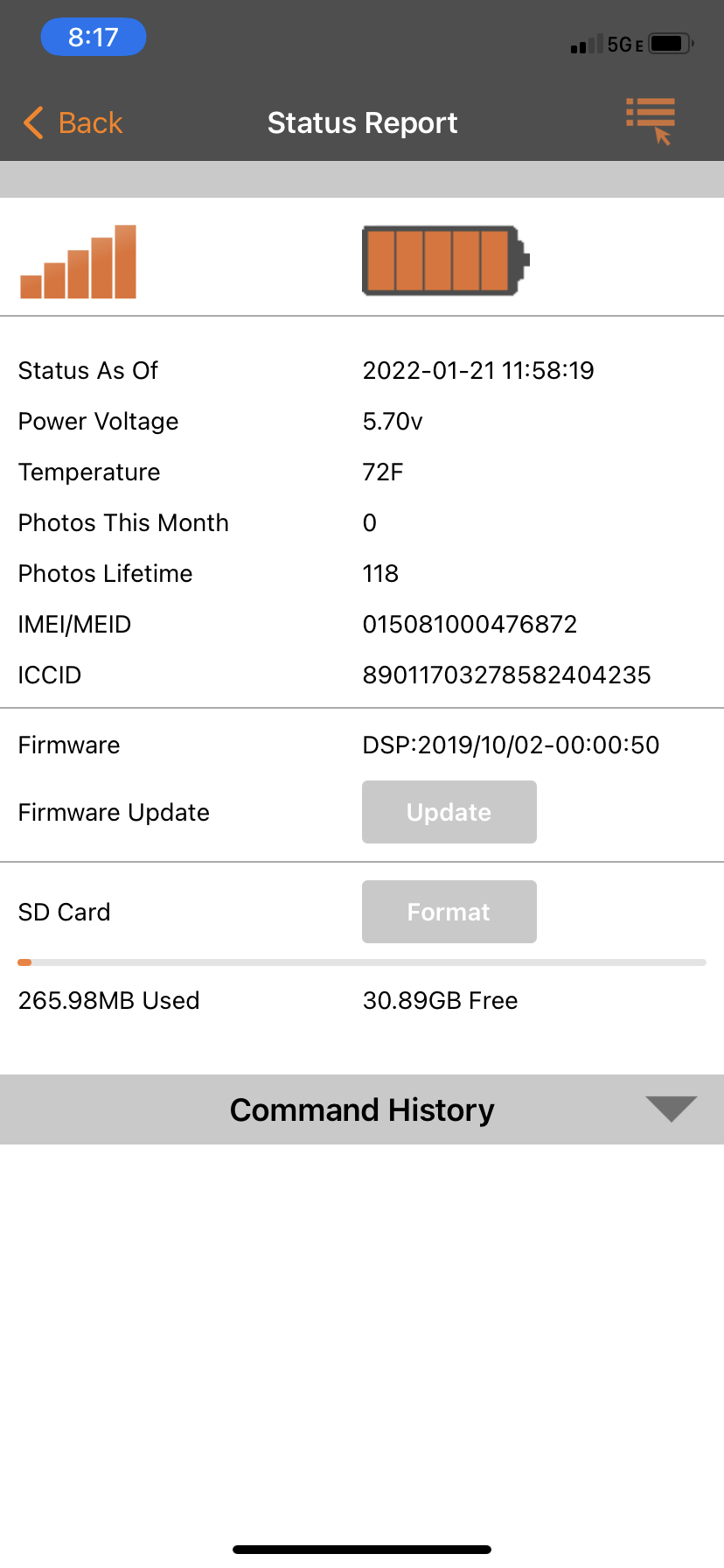
    IMEI 015081000476872

    0
    Comment actions Permalink
  • John Lockburner

    I would try a different SD card. Is the firmware up to date? Is the camera still sending status reports?

    0
    Comment actions Permalink
  • Permanently deleted user

    not sure of firmware, last status update was last day it worked. 1/21/22

    0
    Comment actions Permalink
  • Permanently deleted user

    just tried to register camera as done previously and it said invalid imei/meid

    0
    Comment actions Permalink
  • John Lockburner

    Look at the information screen in the cameras menu and if the imei number matches the one on the sticker and your app.

    0
    Comment actions Permalink
  • Permanently deleted user

    yes all 3 numbers match across the 3 areas

    0
    Comment actions Permalink
  • Permanently deleted user

    Time to send it back?

    0
    Comment actions Permalink
  • John Lockburner

    Did you try a different SD card? have you always gotten the data through Spartan?

    0
    Comment actions Permalink
  • Permanently deleted user

    Ok I’ve tried 3 different sd cards. I’ve tried default settings on all 3 and formatting the cards long and short. The camera passes the hello test in diagnostics with all 3 cards. The results are the same when I try to register camera it says invalid imei number and the test picture goes through all the normal steps but says server error when is should say sent

    0
    Comment actions Permalink
  • Permanently deleted user

    The camera was bought in September and has only been used with spartan data since new

    0
    Comment actions Permalink
  • John Lockburner

    Are you using the camera to format the SD card? You can look at the last status report on the app to see if the firmware is up to date. If you do need to send it back you'll have to contact support and get an RMA. Do you have a different antenna that you could try?

    0
    Comment actions Permalink
  • Permanently deleted user

    I have tried formatting the card in the camera and a long format on a desk top. 2 different SD cards. I have tried formatting 3 different cards in the camera. I can pull an antenna off another camera and try it.

    0
    Comment actions Permalink
  • Elizabeth Swoope

    The camera isn’t going online. You need to cancel the format and firmware update, then update the firmware manually by downloading the FW file to an SD card and using the camera menu to update.

    Here’s a link to the download page. Once you’ve copied the file to the SD card, the FW update option is in the camera’s third menu tab somewhere below the Format option.

    https://my.spartancamera.com/download

    0
    Comment actions Permalink
  • Permanently deleted user

    Its not giving me the option to cancel the updates says timed out complete  

    0
    Comment actions Permalink
  • Elizabeth Swoope

    Then you don't have anything pending. You may be able to update that status report so it doesn't show pending update and formatting but requesting a refresh of command history, but I'm not sure.

    You should be able to complete the steps I provided other than cancelling pending commands.

    0
    Comment actions Permalink
  • Permanently deleted user

    After a long road it has been discovered that camera was “black listed” it was reported stolen to spartan however I recovered and never thought anything else about it. Spartan had the camera inoperable thanks for all the help

    0
    Comment actions Permalink
  • Elizabeth Swoope

    Thanks for the update. At least you know that reporting it stolen did prevent it from being used.

    0
    Comment actions Permalink

Please sign in to leave a comment.