GL-V6Eb Verizon Network Registration Denied

I got this camera months ago - activated with Verizon just fine. Suddenly stopped working and will not connect to network. Confirmed with verizon that plan is up to date and active. All firmware up to date, 32gb SD card (same one used when it was working). Not sure what else to do? Immediately says "Searching for network, please wait" then after a few minutes says "Network Registration Denied!". HELP!
-

Cameras are in separate solar panels. Both cameras are GoLive cameras. I started using the GL-ALTEb model camera in Jan of this year. It is located at my property about 2.5 hrs north of where I live. I just purchased the GoLive camera model GL-A6Eb. I have it at home. I want to make sure it works before taking and leaving it in my property which is 2.5 hrs from my home.
I am using the power chord that came with the solar panel. The camera status shows it is on solar power. For comparison, following are the signal and voltage readings from the status reports received about 8am this morning from the respective cameras. Note,for the older camera, the GL-ALTEb model, the Live feature is working great. The Kive feature for my new camera, the GL-A6Eb model, is still not working as I write this. Data from respective cameras
Signal
ALTEb Excellent (51)
A6Eb Fair (25)Internal voltage
ALTEb 3.93
A6Eb 3.85External voltage
ALTEb 16.18
A6Eb 18.98I’ll get back to later after the A6Eb camera has had more time to charge the internal battery. BTW, I walked in front of it and did get a picture sent. Plus I got updated status reports this morn. Everything is working except the Live feature.
-
Can I have some support please? This was orginally my post and now I am getting emails regarding all of Paul's responses.
No the antenna is not broken, completely intact, no damage. Now the LIVE stream button is green but doesnt load the camera still says "Network Registration Denied"
here is my latest status report finally.
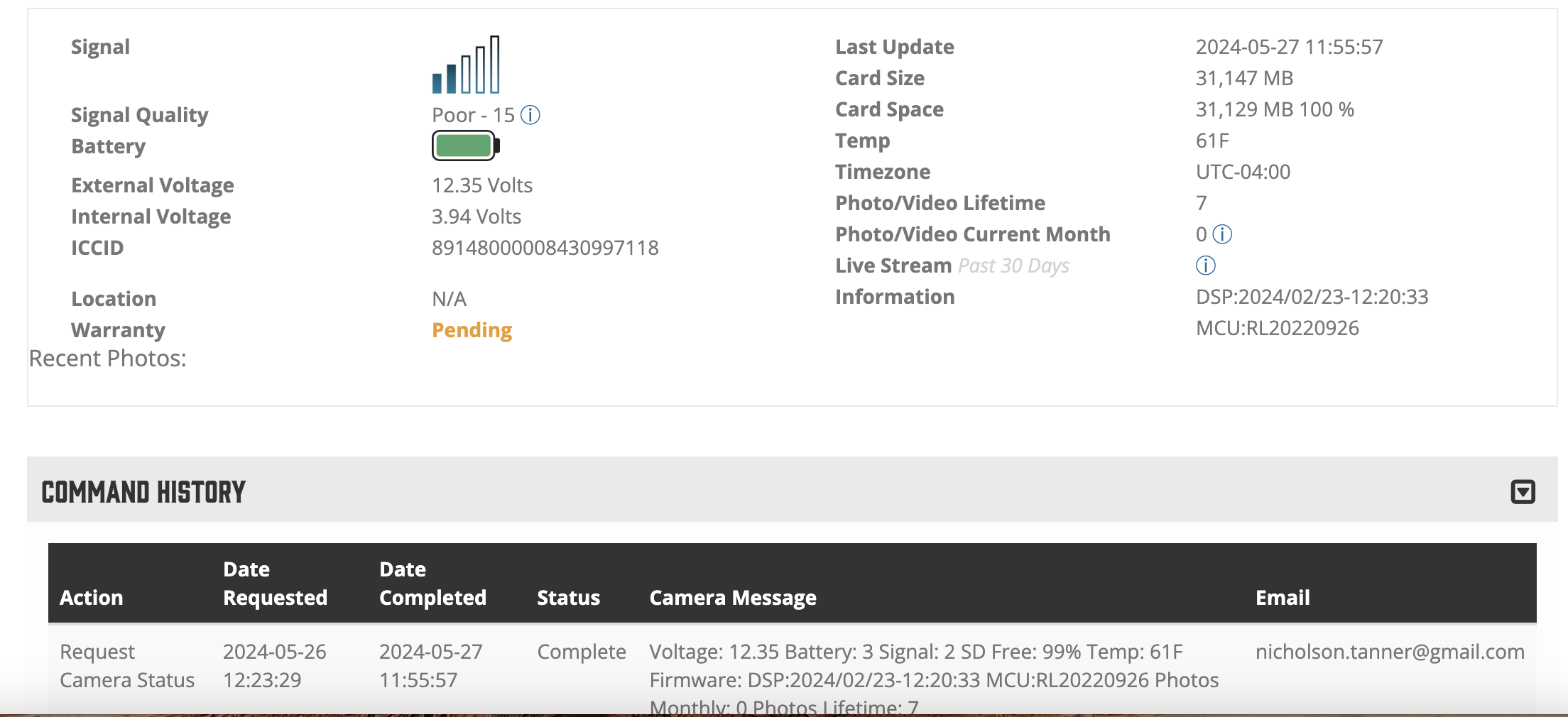
-
Thank you. I got my camera to have signal and work - however I cannot live stream because I am out of credits BUT i pay for a verizon plan every month for this. I tried to connect that plan to my spartan account and it says I need a registration ID - I attempted to get this off my camera to which I get "This Camera is Already Registered" so how do i connect my data plan to my spartan account? I don't want to have to pay for premium credits AND a verizon data plan.

Please sign in to leave a comment.
Comments
43 comments