Camera not taking pics or only occasionally

Noticed few days ago only getting a few pics. Went and checked on camera and everything seemed ok and got pic of me checking cam. Only getting about 3-4 pics a day/night when usually was getting 30-40 a day. Went hunting today and walked past camera and when hunting had 4 deer at different times come and feed about 30 feet from camera for 15 minutes each time. Came home and only had 1 pic of me walking past it. No pics of the deer that were there. I have 10 premium credits yet and have 3 bars of reception. I run external batteries and have 5.7 volts and show fully charged.
-

What model camera (GC-what)?
Did you look at the SD card to see whether the pics are on the card but not sent? You can also look on the portal and see if the picture numbers are consecutive or not. If they are not consecutive, the camera is taking pics but not sending some of them. That is usually a signal problem. Three bars is great for some models, not as great for others.
-
I haven't looked at the SD card. Will have to do that tomorrow when I pull it. I have had 3 bars for 2 months but only recently have this issue. I also use an external antenna. I'll have to wait for the camera to take more pics to see if they are consecutive since I delete the photos daily. I have the model ATTXB
-
ATTxb is less picky than some of the 4G cameras. You don’t have to look at the SD card. Check the portal. If the numbers on the photos are consecutive (or every other one if you are using photo + video), the camera is not taking pictures as it should. If there are numbers skipped, the camera is taking the pictures but not sending them. We need to figure out which situation you have.
-
I got three pics last night all different times. I don't know where the pic number is but on the bottom right on the info line on the pics it has a P5 but all pics are the same number all have P5. Spartan got back to me also and told me to change the APN settings from APN BL to APN BR. Will see if that helps but unsure how my settings would have changed by themselves.
-
Well I changed the setting on the APN and everything seemed to work during the day yesterday. I set up a spypoint cellular right next to it and it had the same pics as the Spartan go cam but at night I had 15 or more pics on the spypoint of deer but only 2 on the Spartan gocam so the Spartan gocam is missing or not taking pics when it should.
-
Spypoint set to instant as I run external batteries. Still have problem after setting the APN number and have email and call to Spartan support but no response. Seems the Spartan will take pic when deer is real close 5-10 feet away but any further it don't pic up anything. Have it set at high sensitive. Last night had 23 pics on my Spypoint which is right next to the Spartan and only 2 pics on the Spartan. Frustrating I have to use my only other cell cam (Spypoint) to babysit my Spartan while waiting to hear back on what else I can do to fix situation.
-
I don't see anything wrong with the set. Camera isn't too high or too low, not aimed upwards. Johnny may see something that I don't, though.
Have you looked on the portal again to see whether the numbers for several photos are consecutive or if there are numbers missing? You mentioned earlier just two consecutive pics, but that doesn't provide much info. -
I got three pics on the Spartan cam today and they were all consecutive 0715, 0714 and 0713. I'll check in the morning and hopefully will have more pics and check numbers again and also see how many more spypoint pics I have compared to the Spartan. The two cameras are 5 feet apart from each other and same distance
-
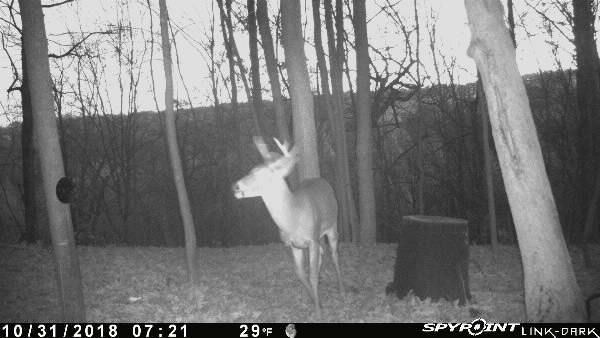
Spartan is saying now to do a firmware update which I did in September but will try another one. In the meantime here is a pic of the Spypooint. Got 24 pics on the spypoint last night and 4 on the Spartan. Pics are consecutive in numbers. I also put the sensitivity back to normal but no difference

-

I would do an update for sure if there's one available. Does the spypoint have burst on maybe? I would tip the Spartan up a little bit. Where the deer standing in the picture you posted is good but if something is walking along the woods in the back of the picture or by the stump feeder it may be a little high for the sensors. If you can I would put both cameras on the same tree, it will give you better results. Is the spypoint getting deer that the Spartan isn't or is it just taking more pictures when the deer are there?
-
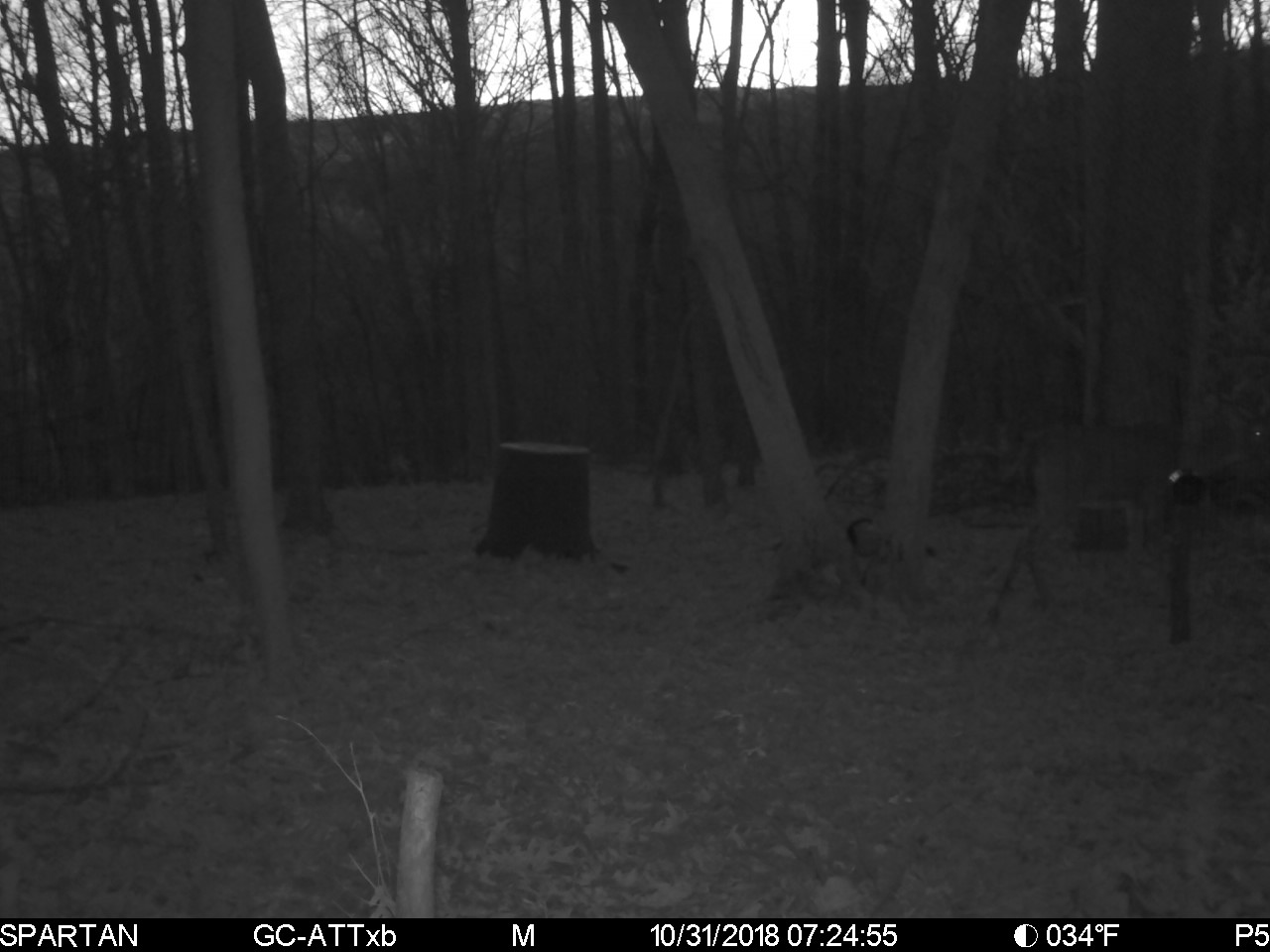
Those cameras may not be very far apart but the area they cover is very different. Look at how big the stump looks in the Spypoint pic compared to the Spartan pic, how much less foreground is in the Spypoint pic. It looks like the cameras are looking at different views unless there is something attached to two different trees.
-
That's what Spartan said to do is an update but I purchased this camera back in Dec 2017 and first thing I do is updates. I checked there most recent update and it is 09/07/2018 which I did on this camera just prior to putting it out. Spypoint camera is set up same as Spartan to take 1 pic only. Spypoint is getting deer that Spartan is not. Last night I had 23 pics on Spypoint all of deer and Spartan got 4 pics. The only difference is the angle of the Spypoint being on a different tree but trees are only about 5-8 feet apart difference. My main concern is why I wasn't getting pics like I said in first message of deer when they were right in front of Spartan camera but got a pic of me walking by setting up scent wicks
-
It’s not about the camera being “picky.” It’s about learning the best way to position the camera. Every camera model is different.
You made it sound like the two cameras were in exactly the same location (which to me means basically on the same tree one above the other or side by side aimed at the same spot.) It is clear from the two photos that they are in the same general area but far enough apart that they have very different views of the set.. Either the Spypoint covers a much narrower field of view or it’s a good bit closer to that stump. They also appear to be aimed in different directions. Those things affect how cameras perform.
-
I will put cameras on same tree this morning. Point the Spartan up a little and point the Spypoint up also unless I put it on top of the Spartan then down a little. I just got in 6 pics of this buck 20 minutes ago on the Spypoint and only 1 on the Spartan leaving on the left. Why wouldn't the Spartan pick up what the Spypoint did? Notice the stump and where the deer is on the left. The Spartan and Spypoint are pointed directly at it.


Please sign in to leave a comment.
Comments
29 comments