Stopped getting pictures.

I have had my cameras set up for about six weeks and have been getting several pictures sent to me daily. All of a sudden, as of July 14, I haven’t gotten pictures from either camera. I have one Verizon and one AT&T so I know it cannot be the service provider. To validate that I’m not getting the pictures, I had my uncle walk in front of the camera earlier today with quite a few passes and no pictures came through. (I am in Hawaii and he is in Minnesota where we will be hunting.)
I had him turn off the camera, turn it on to set up and wait for the signal and carry her name to appear, and then turn it back on. Everything went according to how it should, except I still don’t get any pictures. I was trying to look for a way to make the camera take a picture remotely from the app and send me a pic to make sure it’s working, but I can’t seem to figure if there’s a way to do that.
There is plenty of room On the memory cards so I’m just not understanding what the issue could be. Any suggestions or help would be greatly appreciated.
In Him,
Frank
-

Are you using the app? Do you have premium credits? In the app, Account > Premium Credits > Check Credit to check. (This is the most likely cause, especially if your cameras are new and have been working for about a month.)
There is no way to command the cameras to take a picture. You can, however, use scheduled events (look on the settings page in the app and scroll down) to tell the camera to check in with either a status report or a photo at specific times (and specific days if you want to do that). All of my cameras are set to send me pics at 9 AM, 3 PM, and 9 PM. I get status reports at midnight, 3 AM (takes care of time changes), and either pics or status reports at 7 AM, noon, and 6 PM.
-

Are you still getting your daily status reports? if so that's a sign that the problem is probably out of credits.
When at the camera if you turn it off and back to set up and wait for it to find signal you can press the OK button to take a picture and then press it again to send the picture. Watch what happens on the screen and see if the camera says "sent" or if you get an error.
-
I ran a check to see if my premium credits are still valid and they are good till September 6, 2019. ( I Purchased a three month one gigabyte credits on June 6, 2019.)
There were no error messages when I had him turn the camera back on to standby to check to make sure that the signals were going through and he was receiving the cellular carrier services.
When I look at the app, it shows the battery strength on the cameras as well as the cellular signal strength.
He has already left the area and so I was wondering if there is anyway to check the cameras function remotely? -
Please look in the app to check premium credits. In the bottom right corner, tap Account, then Premium Credits, then Check Credit. If you are getting your data through Spartan, then your credits are included in the data plan price. If you are getting your plans through the carrier (AT&T or Verizon), then credits are an additional charge.
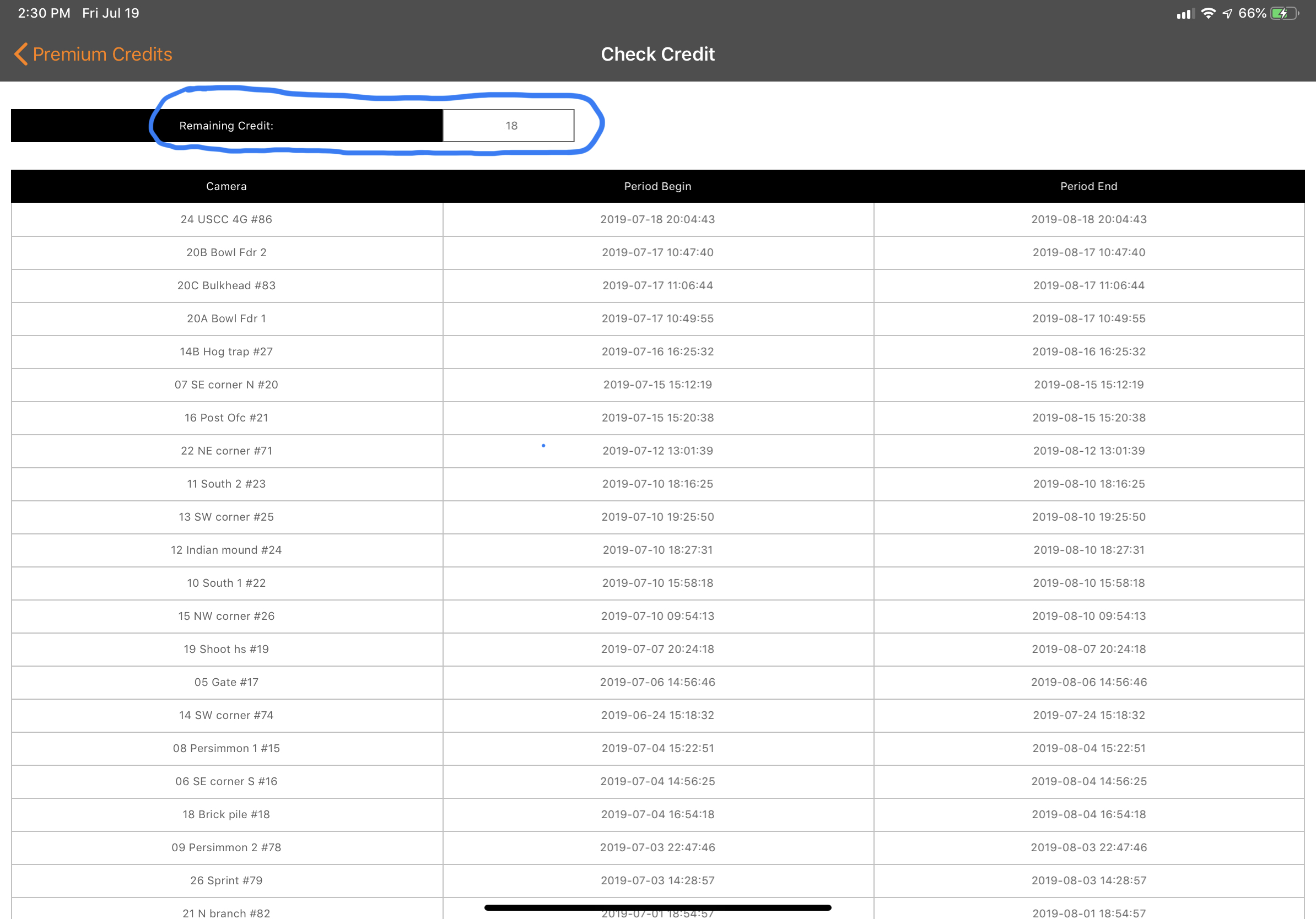
-
If you want me to take a look at things you can email me your portal log in information. My email is johnny.lockburner@spartancamera.com
Please sign in to leave a comment.
Comments
11 comments