Camera will not power on

I have a 4G go cam At&t it will not power on the screen is black. Anyone else ever had this issue. The batteries are brand new even bought another set and tried just to be sure.
-

Same suggested things to try. Different SD card. Manual FW update. You don't mention which Verizon model, but both Ghost models (W and G) and the Z models had FW updates on 11/22/2019.
Here's the download page and the instructions: https://my.spartancamera.com/download
Because your camera will not power up (and if changing the SD card doesn't fix it), you will need to use the Playback button method.
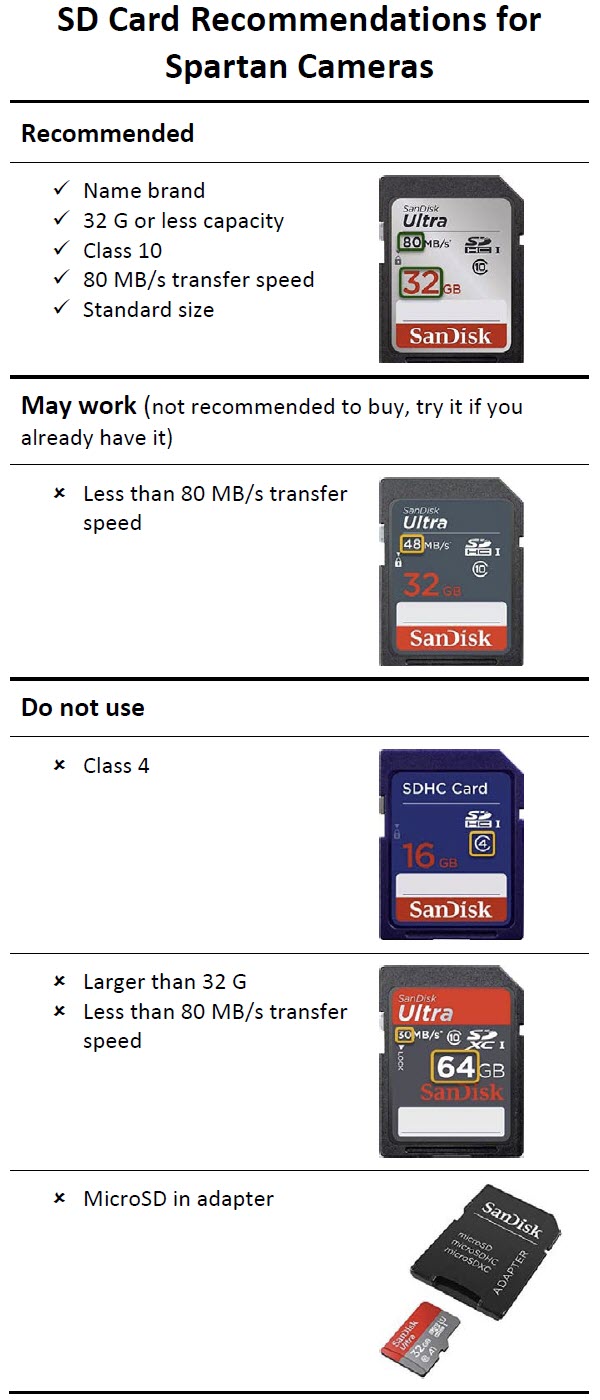
Also, make sure you are using a "to spec" SD card.
-

Ok, I see lots of questions with no answers..... If it wont fire up, we tried different "to Speck" cards, tried onboard power source and external, and still will not fire up.... it is over one year old, and worked perfectly until it suddenly didn't.
Then whats a guy do?
Why don't I see an simple email address to support? Maybe even an 800# to call?
Seems like one has to go along way around to get the support.
Jason LaFitte in Conroe, TX
-

To ensure that we are able to respond to your request as quickly as possible, please include the following information when leaving an email or voicemail:▶Your first and last name
▶Contact information and when we should/should not contact you
▶Camera Model (GC-####)
▶A brief description of your issue
▶When calling, you must leave a voicemail in order to receive a callback if we do not answerCall: 770-582-0004 | Email: Support@Spartancamera.com
-
On the home page, all the way at the bottom, Contact us. Here's the link. I agree that it should be easier to find and will pass that along.
https://spartancamera.com/i/contact-us
Did you try installing the firmware manually (if the green light is flashing, if not then that won't work)?
-

Did anyone find an answer to solve this issue? I have 2 Verizon GC—V4Gb cameras that were operating fine, the batteries died and after putting new batteries in will not send pics. The card is a recommended one, firmware is up to date and hello test is successful. It shows full antenna bars, but will not send pics. Any solution to fix this or to do a hard reset is greatly appreciated.
-
Default is in the third menu tab. Please try that.
Did you format the SD cards in the cameras? Third menu tab. Did you try different SD cards.
Do you have any class 4 SD cards you can try? Some users have reported that this model camera won’t work with the recommended SD card even though i5 has in the past.
You can also try installing the latest firmware manually even though your FW is current. Sometimes, the FW gets messed up when batteries die.


Please sign in to leave a comment.
Comments
17 comments