timelapse

On my old bushnell cams i could set it to timelapse for about 30 minutes before sun up to 2 hours after sun up, and the same thing for the evening. It would still take pics if triggered throughout the day.
Is that an option. I tried to get something similar with the spartan, but if I set the 2 time lapse intervals, then the camera doesn't work outside those times.
Any ideas?
-

Is this still how this is operating? I am using an older 3G Gocam and currently have it set up as follows:
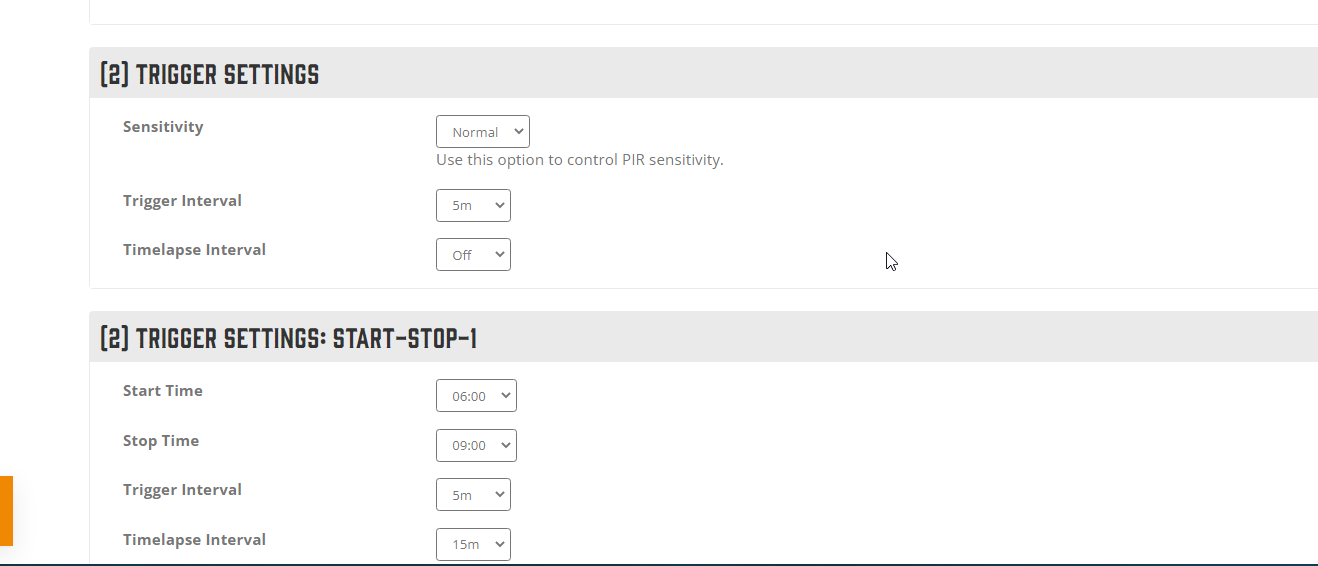
Under Trigger Settings I have "trigger Interval = 5m", Timelapse Interval = Off
Under Trigger Settings: Start-Stop-1: I have Start Time = 0600, Stop Time=0900, Trigger Interval = 5m, Timelapse Interval = 15m
Under Trigger Settings: Start-Stop-2: I have Start Time = 1400, Stop Time=1700, Trigger Interval = 5m, Timelapse Interval = 15m
I thought this setup would give me motion sensed photos at all times over 5m intervals, as well as timelapse photos every 15m between 0600 - 0900 and 1400 - 1700. Unfortunately, I seem to be getting timelapse photos all day and all night.
Is there something I can do to at least only get the timelapse photos for 3hours in the morning and evening?
-

What does it look like from the app? (Regardless of whether you can see the trigger setting info or not, the camera should not pay any attention to those settings if there is even one start-stop setting used because once you set even one start-stop, it should pay attention only to start-stop.)
-
You may want to check with support (support@spartancamera.com, 770-582-0004). I don’t have a 3G camera to test with and I doubt anything will change with settings or the app since 3G cameras won’t be around much longer.

Please sign in to leave a comment.
Comments
14 comments