Camera not taking pics

-

Trey,
What's the date on your cameras firmware?
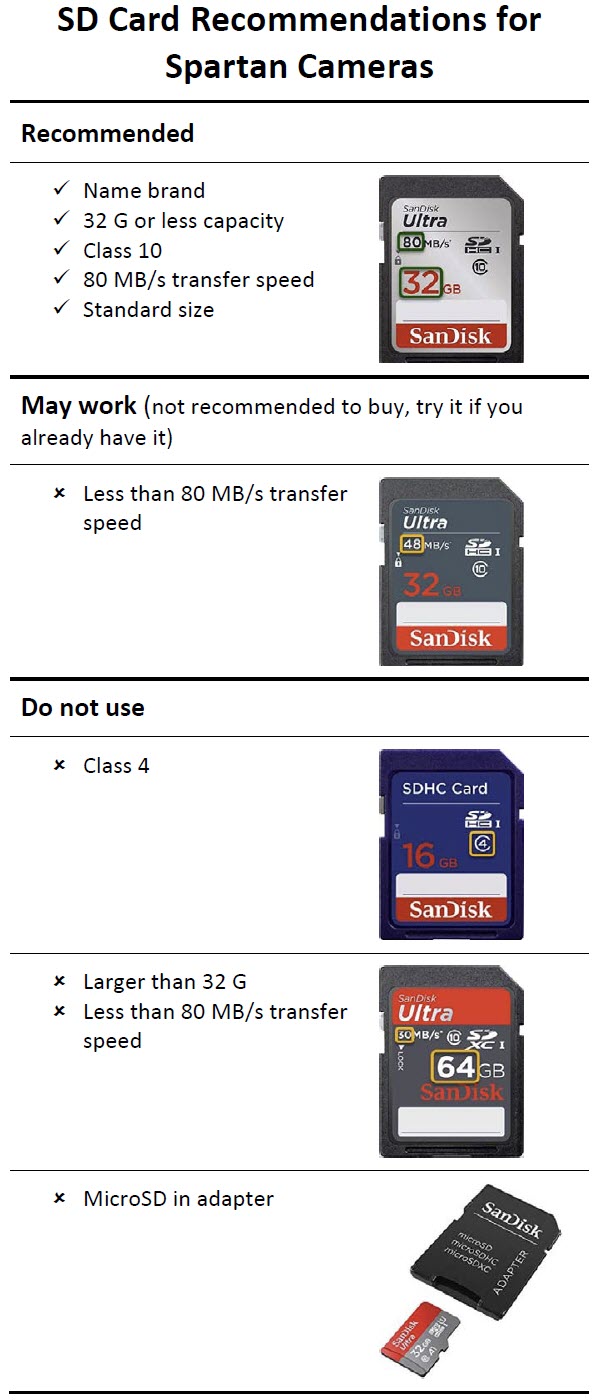
Are you using a to-spec SD card? Are there pictures on the SD card that aren't getting sent? If there's any way you can post a screen shot of your status report from each camera, that would be helpful. However, that may not be possible. I can do that from my iPads but not from my Android phone.
-

The date on the firmware for both cameras is 11/28/2018.
The SD card is a 32GB Class 10 card.
The cameras are taking pictures that are not being sent.
I could not post a status report (it was too big). However, 1 camera updated the report last night and 1 camera has not updated since the 12th. Both cameras, report a full signal and plenty of battery. Also, plenty of room on both cards.
Thanks for the help.
-
Trey,
You said your firmware was up to date, but it is not. There have been at least two versions released since that one, maybe more. The latest version is 9/30/2019 and it is for a connection issue.
I have a sneaky suspicion that the old firmware is causing your problems. Since the cameras have a connection problem, they're going to struggle with and probably not complete an over the air firmware request.
When will you have a chance to go to your cameras? Doing a manual firmware update is probably going to be necessary.
Here's the page with the firmware for download. If you have any pending commends, you'll need to cancel them.
Download using the instructions here, then update using the instructions below the firmware updates table. You'll need a different SD card for each camera because the camera erases the file after it updates so you can't use the same SD card in each camera.
https://my.spartancamera.com/downloadI don't know how computer-comfortable you are, but here's a video on downloading the FW to an SD card in case you're not computer-comfortable. Make sure the file doesn't have any spaces, parentheses, or numbers within the parentheses (or on a Mac, no hyphen or number after the hyphen).
-
Gotcha. I guess the over-the-air update feature doesn’t work because I updated firmware via app before I deployed the cameras in August (it should have caught the firmware update previous to 9/30 version). That, and lack of notification of a new firmware update, is why I assumed I had the latest version.
I will do the manual update. Thanks for the help.
-
Trey,
Under normal circumstances, OTA would work. However, because this particular update fixes a connection issue, you have a camera that is having trouble connecting in the first place and it has to connect and download a largish file. I'm running several of these that had newer firmware than yours does and they weren't experiencing the connection issue and that were able to update OTA.
Unless there's another connection issue that crops up (and stuff like that happens with the carrier makes changes to their network and the unintended consequences are that things break), you should be able to update OTA in the future. The app now has an orange Update button on the status report page if your camera FW needs to be updated.
The FW that was available in August was 7/3, I think, so it appears that your camera FW didn't get updated in August for some reason.
If you have any pending commands, make sure you cancel them before you do the FW update. Then default the camera. After taking/sending a couple of manual photos after the update, request a settings update to get your cameras back the way you want them and take/send at least one more manual photo.

Please sign in to leave a comment.
Comments
20 comments