Camera Not Taking Pictures

-

You are deleting from the app? (Asking because you can also delete from the portal, although you probably shouldn’t delete from either.)
It’s best to let pics purge automatically from the app. In the app, Settings, change purge days to something less than 30. I use 7 days, but you can use less than that. Just remember to save anything you want to keep.Android or iOS?
If there are pending commands, please cancel them.
Have you tried taking/sending a picture manually? With the camera in setup mode and on the network, point it at something, press OK to take a picture, the press OK again to send it. What does the screen say?
Are you sure it’s not taking pictures or is it taking pictures but not sending them?
What SD card (brand, class, speed, size, capacity) are you using? Have you formatted the SD card? Tried another SD card?
Is the camera on your Verizon phone plan or are you getting your data from Spartan? -
Let me make sure I answer all questions.
I deleted the app and went back to the App Store and redownloaded it to iOS. As soon as I signed in all the pictures came back up that were previously deleted. I have not tried to take a test picture but I can do that tomorrow. Also not sure about brand SD card but it worked fine for at least a month. Verizon unlimited data plan all going to app. I have canceled all pending commands. I also just moved purge to 7 from 30.
-
All the pictures downloaded again because you deleted and reinstalled the app. The pictures are on the portal for 30 days so the app is downloading the most recent pics. I don’t remember whether it downloads everything from the portal or just the last 50 pics.
SD cards work until they don’t....
Wait. You deleted pics from the app, then you’re not happy because the pics are coming back when you reinstall the app, but you increased purge days from 7 (so everything you haven’t saved goes away on day 8) to 30? I’m definitely confused.
-
When I go to the app now, I see there are no pictures. When I log off the app then log back in, The pictures are previously deleted start downloading again. Today when I went to the camera in the woods, It was showing zero of 3000. When I installed the new batteries it is showing that it was updated today on my app. I will do a test picture tomorrow because I have not had a picture of a deer in days.
-
When you log out of the app and back in, there shouldn’t be any photos downloading. Now if you delete and reinstall the app, that’s different.
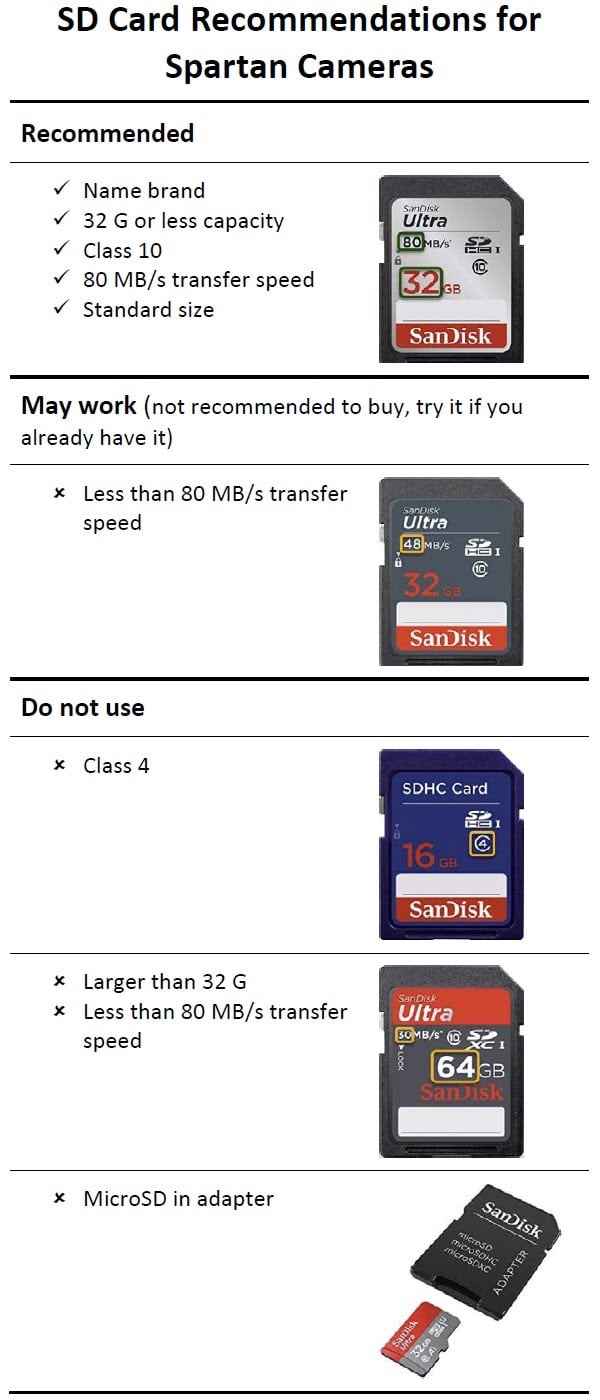
The camera is not taking pictures if it’s showing 0 of 3000, but that sounds like a small SD card. If it is small capacity, chances are it’s not a class 10. Make sure the SD card is standard size (not micro SD in an adapter), class 10, 80 MB/s or faster, 32 G or less capacity.
What is the date/time of the latest status report?Make sure that sensitivity is normal and that daily limit is 0, also that you don’t have start-stop times set.
-

Couple of things, it very well could be the SD card so check that first. Also since you are getting your data from Verizon do you have premium credits? Thirdly, default the camera in it's menu. Since the camera is showing zero pics on the SD card I really think that is the problem.
Please sign in to leave a comment.
Comments
7 comments