Not connecting to network

-

Is the firmware current on both cameras? If not, make sure it is. You may have to do a manual update.
5 days to update indicates that you likely have either an SD card problem or a connection problem.
SIM card error just means it’s having problems connecting to the network. That can be caused by FW problem, antenna problem, SD card problem, SIM problem, and maybe some things I’m not even thinking about right now.
If this is both cameras, can you pull them and bring them to your house? It will be easier to troubleshoot there. If you can do that and are on Facebook, private message the Spartan Camera FB page and I’ll try to help you via chat.
-
Both cameras have the FW update. I put new SD cards in and new batteries. Like I said I never had an issue til this FW update. I pulled both cameras and didn’t have an issue when not in the woods. But as soon as I get out there they won’t connect. Or checked with US Cellular and it’s not a network problem.
-
If the cameras work when not in the woods but don’t work in the woods, then it seems likely that something has changed in the woods.
You may want to contact tech support (support@spartancamera.com) and see if they have any other suggestions. They also may be able to send you the older firmware so you can see if rolling back corrects the problem, or they may have another update that’s not publicly available yet.
-
Please humor Johnny and try different SD cards. It may not make a difference, but then again, it may. You would not believe how many different problems SD cards can cause. They work until they don’t. There have been so many times when people have insisted that it can’t possibly be their SD card, except that when they changed it or formatted it, the problem magically went away.
I’m not saying that it’s a certainty that it will fix the problem, but changing the SD cards back to the ones that worked, formatting them in the camera, and trying, will either fix the problem or it will rule out the SD cards as the problem. Unless you try it, there’s no way to rule it out.
-
One camera worked for awhile this morning then appears to cut out again. Put the SD cards in there that I was previously using and nothing seemed to change, still wouldn’t connect to network. Only other thing I’ve changed lately is I went to external 6V batteries. Hooked two up in parallel, if that’s anything to help
-
I was just saying to try some internals to see if the externals are the problem. You can run a camera with 4 batteries. That’s so that if you are low on batteries, you can get the camera up with less than a full set of 12.
I run a full set of 12 rechargeables in all my cameras, which are on battery boxes with 12 Ah (or larger) batteries and solar panels because sometimes the power cable comes unplugged or I haven’t plugged it in completely. With the old-style cases that you can’t open or close with the cable plugged in, having four batteries means you can do a manual test photo send before closing the camera.12 Ah is typically what I use. I’ve used 7 Ah or two 7 Ah, but the 12 Ah is probably a sweet spot as far as cost goes.
-
Update:
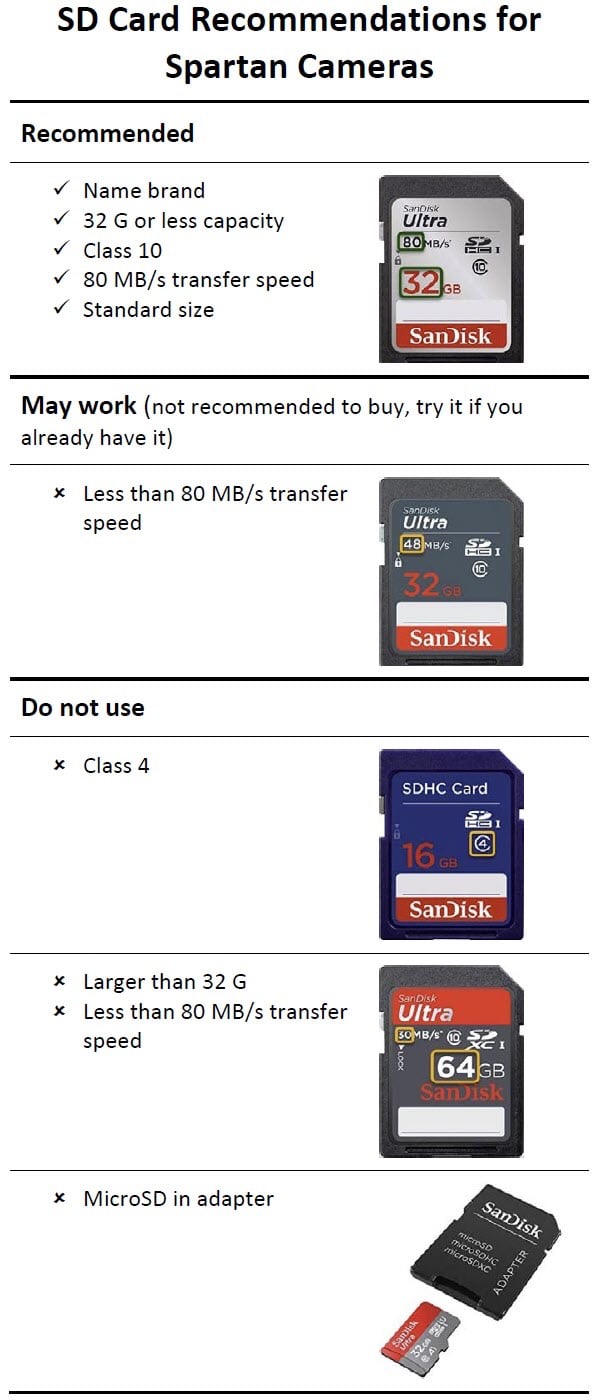
- Purchased new recommended SD cards for all 4 of my cameras.
- Removed my external battery packs and went back to 12 new AA batteries in every camera.
- Upgraded my older 3G cameras to the 4G (GC-U4Gb2).
- Made sure all the cameras were up to date on firmware.
Currently 2 out of my 4 cameras are working just fine, but I did have troubles on start up. All the cameras would not connect to network then prompt error about sim card, then the camera would restart and connect. When trying to do a hello test it would fail due to network. I pulled the batteries, SD cards, SIM cards and reinstalling it would take awhile but would connect to network. All this was while I was at home. Everything seemed to be working fine, sending pictures, powering it on and off, it all seemed normal. But once getting out to the woods an hour later the problems reoccurred and after trying previous steps mentioned, some worked and others took several times. They all did say they were connected and passed hello test.
After being out there for 12 hours- 2 out of the 4 are working great, the 2 that are not working will not send status report or let me update settings and not sending pictures. The 2 that are working are about 30 miles from the 2 that are not. I tested them all when putting them up in the woods by manually taking and sending a picture and had no issues but nothing since. Normally I have hundreds of pictures in one night of animals, mostly racoons camping out on the corn. haha. I have contacted US Cellular once and again and they show that everything on there end is working properly. They mentioned maybe Spartan was having server issues?!? I pulled the SD cards from the past few days and the cameras were taking the pictures just not sending them to my phone. I'm also using the app instead of emails.
This has been frustrating since I'm constantly having to go back and forth burning fuel and time to check the Cards, switching out cameras, or trying other suggestions. Let me know what you think and appreciate the support. Just hope to get this resolved soon.
-

To me it sounds signal related, I'm not sure if the firmware update would have anything to do with that but you can email Support and they may be able to email you a copy of the previous firmware that you could load on the camera and see if it makes a difference. One other thing to try might be one of the upgraded antennas. On the cameras that don't send a manual picture what does it say on the screen when it's attempting to send? As far as I know there are no server issues.
-
It’s just odd that I haven’t had one issue in 3-4 months til I did the firmware update. I’ve always had good signal with the new 4G ones.
I didn’t have any issues with sending them manually but after flipping them to on I haven’t got nothing since.
I will email them and let you know what they say
-

I’m having very similar problems to Dylan. I’ve gone through all the necessary steps of swapping out the recommended sd cards, formatting them and also keeping fresh new lithium batteries in. I am also starting to spend more time keeping the camera going than I am hunting. I’ve had issues with this same camera about 2 months ago with similar problems that we addressed on a separate thread.i have now started hunting a new area. I have full signal when I arrive at the entrance but when I get to the area I would like to hang the camera I have no service. I walked around aimlessly trying to get signal and finally got it once I got away from my blind. I set up a corn pile since I was off of the trail and sent a hello test to my phone. Worked flawlessly so I switched the camera to the on position. Ever since then I have not received a status report update or any photos that I have set to make sure the camera is working. Thinking I may have a bad antenna or camera?
-
You didn’t mention camera model or firmware situation, which would be helpful. Also where are you buying your data?
Did you check the antenna to make sure it was snug but not too snug? Did you take/send a manual photo? Is there any chance at all that you left it in setup mode?
I used to run a camera in a spot where it sometimes would not go online. I’d have to take it several yards away, get it connected, then walk it back to its spot. Signal is somewhat transient in poor reception areas. The Hello test just confirms that the camera has a data connection.
-
GC-Z4Gb2/ firmware utd/ bought credits through spartan for 3 months (still one month left)
Checked camera, which was in the ‘on’ position, and it had been taking pictures but they were not being sent to my phone. I took a photo when I first opened the camera door and sent it to my phone. It reached my phone within a couple minutes. I had done the same thing before I had left it 5 days prior which it successfully sent to my phone. Completely at a loss why this camera won’t work efficiently
-
Maybe try putting the firmware update on an SD card and update manually. He's a link to the downloads and instructions.
https://my.spartancamera.com/download
Please sign in to leave a comment.
Comments
36 comments