Spartan Go Cam-Connected by Verizon

Comments

18 comments

  • John Lockburner

    What camera model, GC-?????? Where are you getting your data from?

    0
    Comment actions Permalink
  • Greg Burnett

    GC-V4GI/GOCAM


    Verizon/SD Card

    0
    Comment actions Permalink
  • John Lockburner

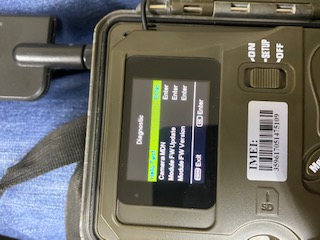
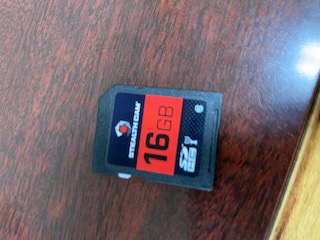
    That model is very picky about SD cards, make sure it's a class 10 and 32gb or smaller. Also 80mbs or higher and formatted in the camera. I would try defaulting the camera in it's menu as well. Can't hurt to clean the contacts on the SIM card, usually a pencil eraser works. Can you post a picture of the information screen?

    0
    Comment actions Permalink
  • Greg Burnett

    0
    Comment actions Permalink
  • John Lockburner

    First thing I would try is a different SD card, I can't see the number in the circle but it's probably a 4. The info screen is an option in the menu, will show the firmware version and IMEI number and other info.

    0
    Comment actions Permalink
  • Greg Burnett

    0
    Comment actions Permalink
  • Greg Burnett

    The SD card is a 10, I formatted the card in the camera, don't know what to do now?  My other camera has same card at ranch and is working effortlessly


    0
    Comment actions Permalink
  • John Lockburner

    The camera is not showing the IMEI number. It very well could be that the SD card went bad. How close is the other camera? Can you try swapping SD cards or even SIM cards. Did you try the default?

    0
    Comment actions Permalink
  • Greg Burnett

    I'll go to verizon and get the to give me a new sim card, my other camera is about an hour and a half drive from here.  Thanks will advise!

    0
    Comment actions Permalink
  • John Lockburner

    You can also try doing a manual firmware update. Even though it's current it can't hurt.

    0
    Comment actions Permalink
  • John Lockburner

    You can call Verizon first and make sure the SIM is active. I have seen them get mysteriously turned off. It also really could be that close SD card. SanDisk is the best from what I have seen in the cameras.

    0
    Comment actions Permalink
  • Greg Burnett

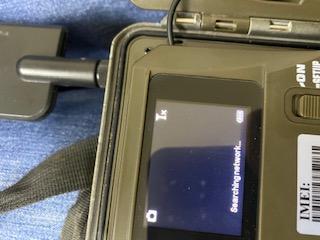
    OK, went to Verizon installed new sim card, and input IMEI, coporate was on phone with rep and as soon as it was activated the IMEI disappeared?  Rep told me that there was a problem with the device...........please advise?

    0
    Comment actions Permalink
  • Greg Burnett

    As stated before, the device worked great for about a week, then quit working on 03/03/2020........

    0
    Comment actions Permalink
  • Elizabeth Swoope

    Please contact tech support. They don’t monitor this forum.

    support@spartancamera.com or 770-582-0004. 
    0
    Comment actions Permalink
  • John Lockburner

    Try defaulting the camera, then turning it off and back on. With the firmware update the camera needs to find signal most likely to display the IMEI number. If it will let you try and do a hello test in the camera menu (diagnostics)

    0
    Comment actions Permalink
  • Greg Burnett

    Still searching for network with new update, called in to support!  TY

    0
    Comment actions Permalink
  • John Lockburner

    Gregg, did you try updating the firmware again or a different SD card? I've seen bad SD cards keep a camera from even turning on.

    0
    Comment actions Permalink
  • Greg Burnett

    I'll try a new SD card next  :0(


    Thx


    0
    Comment actions Permalink

Please sign in to leave a comment.