Camera Stopped Sending Pic

Have been getting pictures every day. On July 9th I got my last picture and nothing since. My buddy put fresh batteries in it and is has full signal. Any suggestions what i should do? Here is the latest status report.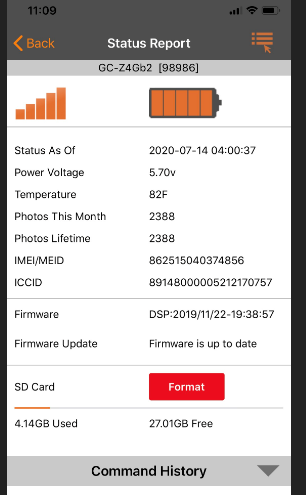
-

If you are getting your data from Verizon do you have premium credits? (with Spartan data credits are included so that won't be the issue) If you have credits the next thing I would try is formatting the SD card and making sure it's to spec (32gb or smaller, class 10, 80mb/s or faster and a fulled sized card, not a micro in an adapter. The camera is still sending status reports so you should be able to format the card from the status report screen on the app. Cancel any other pending commands that you may have.
-
It is through Verizon and it says Premium credits remaining credit is 1. I hit format card and now it is un clickable. Will is say anything after it is done or what do i need to do after. It is 2 hours away so i cannot check the card but it is 32 GB full size card but unsure of the other stats but it was a premium one i bought November last year and has been the same one ever since.
-
The card won't format until the camera checks in so you may have to wait until the #1 scheduled status report happens, it might happen sooner if the camera tries to send a picture. You should receive a photo with an F on the bottom of it once the format is complete. Keep an eye on the status report as well, the used space should go back to zero after the format.
-
You can try formatting again, if you'd like email me your portal log in information and I'll take a look for you. My email is johnny.lockburner@spartancamera.com That red format button doesn't mean you need to format, it just means that you can if you want to.
-

Michael,
Did the format happen but not fix the problem or did the format not happen at all? If it happened, but the status report still shows that the card isn't almost empty, then please request a format again. When it works, you should get a photo with an F on the info strip.
Unfortunately, SD cards are a pain in the patootie. They cause all sorts of problems that you would not think they can cause, including the camera not sending pics.

Please sign in to leave a comment.
Comments
9 comments