Camera not taking/sending pics

-

Those codes on the app just mean that the app was checking for pictures and there weren't any available, it has nothing to do with the cameras function. What is your camera model and what is the time and date of the last status report? Do you have any pictures showing anything other than P5 in the lower right corner, especially look through some night photos. When you say it's not taking or sending pictures have you looked at the SD card to be sure nothing is there?
-

I am having a similar problem. My camera stopped taking pictures, then it will give me a few pictures and stop. My pictures now seem only to be daylight pictures. I constantly format the SD card because that has fixed problems in the past, I think that did it. I have the camera hooked up to a solar source. Currently it is 8/21/21 at 11:11 Eastern Time. My last status report is from 8/20/21. That is the last time of my last picture.
Internal voltage 3.74v
External volatage 11.2v
I plan to go up to where the camera is Tuesday. I am going to turn it off and then back on and try to reset.
-

Your internal voltage is getting low. That solar panel isn’t providing much power at this point. It needs to be in the high teens or low twenties to charge the battery.
You may be getting only daylight pics because those require less power. The camera may not have enough power to fire the flash.
You should have gotten a status report just after midnight today unless you changed that time. -

Both of my cameras have started to do the same thing, seems to be a new issue the past few months. I was told by support I needed new cards, which I bought & replaced previous cards with (that were fine). Then I was told it could be a location issue (have 3 bars on one, 4 bars on another) My issue is both cameras have battery strength bars showing completely full, but they will just suddenly stop sending pics, or, regather than send 3, they will only send one. Seems to me that the battery strength indicator is completely useless and has got to be a known issue at this point…I see too many “your internal voltage is low” comments WELL THEN FIX THE DANG BATTERY LIFE INDICATOR!!! WE ARE PAYING A HEFTY PREMIUM FIR THESE CAMERAS FOR THE FEATURES TO NOT WORK WHEN YOU KNOW THERE’S AN ISSUE! To say that I’ve become underwhelmed with my Spartan Cams would be accurate at this point. My last call to customer service was with a person that clearly was not an expert on the functions & settings of the cameras. Spartan, you need to get it together, I’m sure you know there’s tremendous competition from other brands (one newer one in the last 16 months or so) that is going to crush your market share if you don’t step up your game. Firmware updates that fix these known issues should be released immediately. I look forward to your feedback.
-
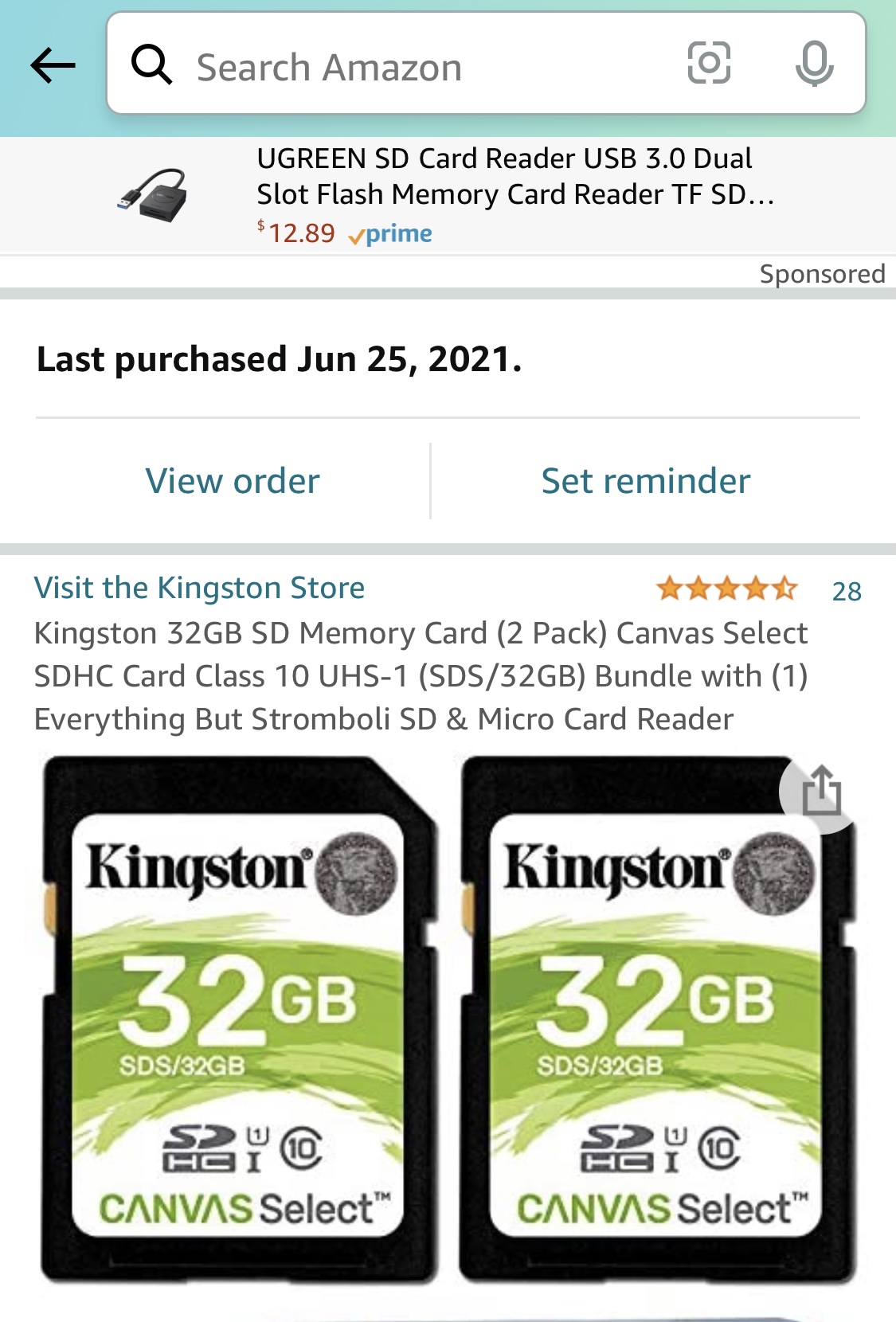
Kingston 32gb class 10. Canvas Select. Exactly what Spartan Support recommended. Regarding status reports: it varies. Sometimes yes, sometimes no. Current status is yes, received status report just after midnight last night.
I do appreciate the response with questions. Please, kindly offer a response with answers/solutions.
-
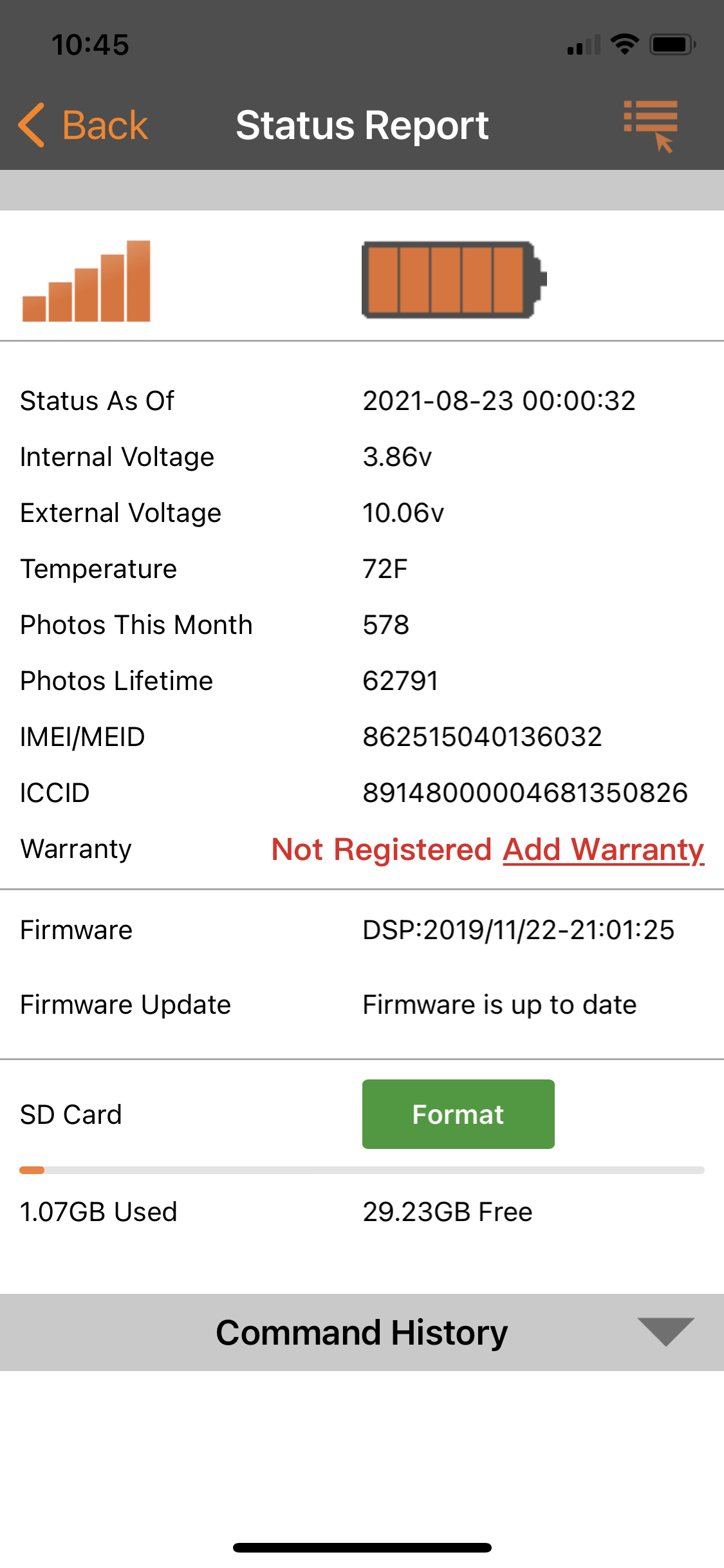
Did you double check that the plan is still active? Are you only getting midnight status reports or do you get them at odd times throughout the day? What is the voltage of the internal battery? If you could post a screen shot of the status report that could be helpful. You might have to switch your phone to desktop view to see the submit image icon.
-
OK Spartan Support, I’ve answered multiple questions, posted this screen shot.
Again, I’ll ask, would you PLEASE kindly answer some of my questions?Why have a battery life indicator if it’s useless and doesn’t give us accurate info? Why haven’t you addressed this known issue with an update?
What, EXACTLY, are the internal and external voltage readings that we need to be watching for since the battery life indicator does not function?
What should those readings be on a brand new set of Energizer lithium batteries be? What reading do we need to change them?Thank you for your assistance.
-
Johnny and I are members of the camera test team, not full-time Spartan Camera employees, and not regular tech support folks. There aren't any Spartan tech support folks who monitor this forum.
Here's information on the battery for Ghost/GoLive that may help. I think that the battery indicator will be changed at some point but have no information on when that might be. There are other, more pressing matters that are higher on the priority list. The most important number is the internal voltage. Once it drops below about 3.7, it's time to change your internal batteries. It gets more complicated with solar.https://support.spartancamera.com/hc/en-us/articles/360043534053-Ghost-battery-information
-
Elizabeth & Johnny, I appreciate your help. If you’re tolerating very obviously tremendously disappointed and frustrated consumers like me out of the kindness of your heart, without any kind of consideration from Spartan, you deserve to be lauded. Thank you. In my opinion, this thread should be escalated to the highest level so the good folks at Spartan can correct the known issue.
A couple things…
Johnny, yes, it’s a full sized sd card.Elizabeth, you said “about 3.7v - my cam is 3.86v, im not wanting to split hairs, but I assume since my cam has been dead in the water for days now, 3.86 must fall within the “about” range?
My earlier question: what will the internal voltage range be with a brand new set of Energizer lithium’s be?
Is the camera still taking (or supposed to be taking) pics when it get to ~3.7v and just not transmitting them, or is it just dead altogether?
-
You'll usually see 10.6-10.8 with new lithium batteries. That internal battery is rechargeable so I wouldn't be concerned with the 3.86. The cameras usually keep taking photos for a while after it stops transmitting. Also I just want to clarify for my own sake that your data is through Spartan and not Verizon (with Verizon plans you need premium credits and with Spartan plans they are included)
-
Your batteries are not the problem. Your internal is nowhere near 3.7V. The cameras usually die at about 3.6V. Highest is a hair over 4.0V. I consider 3.9V or higher pretty much full. Under some circumstances, they charge to 4 or a little higher, under some they tend to top out around 3.9-ish. What you don't want to see is the battery hitting 3.7 and continuing to go down. With solar power, you'll typically see a drop in the internal at night and then an increase during the day when solar kicks in.
Your AA are high, as well, over 10V. Batteries are unlikely to be your problem.
Most of us have learned to use the actual voltages and ignore the battery indicator. The indicator works great for the GoCams (as long as you realize they're not like fuel gauges). The battery indicator annoys me (and lots of other people) and it's confusing, but compared to some of the other things we've dealt with, it's annoying, not critical. Hopefully it will be changed at some point to something less confusing.
(Your questions are mostly answered in that article that I posted.)
The problem may be the SD card, may be premium credits (if the camera is on your Verizon phone plan), may be something else but it's not your batteries. -
Well, I get all my data usage notifications and billing for usage from Spartan, not Verizon. Always have. Always use my credits early, prior to the 90 day renewal, and they’ve always just rolled over and charged me again.
If it’s in fact, the brand-new, just purchased sd card, then it will be like the 4th or 5th card that has supposedly been bad. If that’s the case, then I would suggest, anecdotally, that the camera itself is corrupting these cards over & over & over again.
-
You have a Spartan data plan so credits are not the problem. Credits are included with the Spartan data plan. If your plan renews early, it’s because you’ve run out of data, not because you ran out of credits. We can rule out lack of credits as being the problem.
Can you please post a picture of the SD card, maybe from where you bought it? Did you format the SD card in the camera when you put it in? -
Are both cameras the same model? Honestly I would try a different brand and see if that makes a difference. The Specs on the canvas select cards say up to 80mbs which is the minimum that you want for the camera.
Did you check the picture numbers on the portal? Does anyone else have admin access to your cameras?
-
Both cams, Exact same model
No one else has admin access.
Those are the exact cards support recommended I switch to when I was having the exact same issue in June. This is what I mean by Spartan having real issues. John, you are suggesting that it could be the card, yet it is exactly the card that Spartan support recommend. I am more than willing to try another card but shouldn’t Support be more on the ball than this? Either the camera is bad or the support team is bad, or both. Why am I not having this issue on the other cam with the same card?
Please sign in to leave a comment.
Comments
33 comments