GoLive GL-VLTEb - Not responding

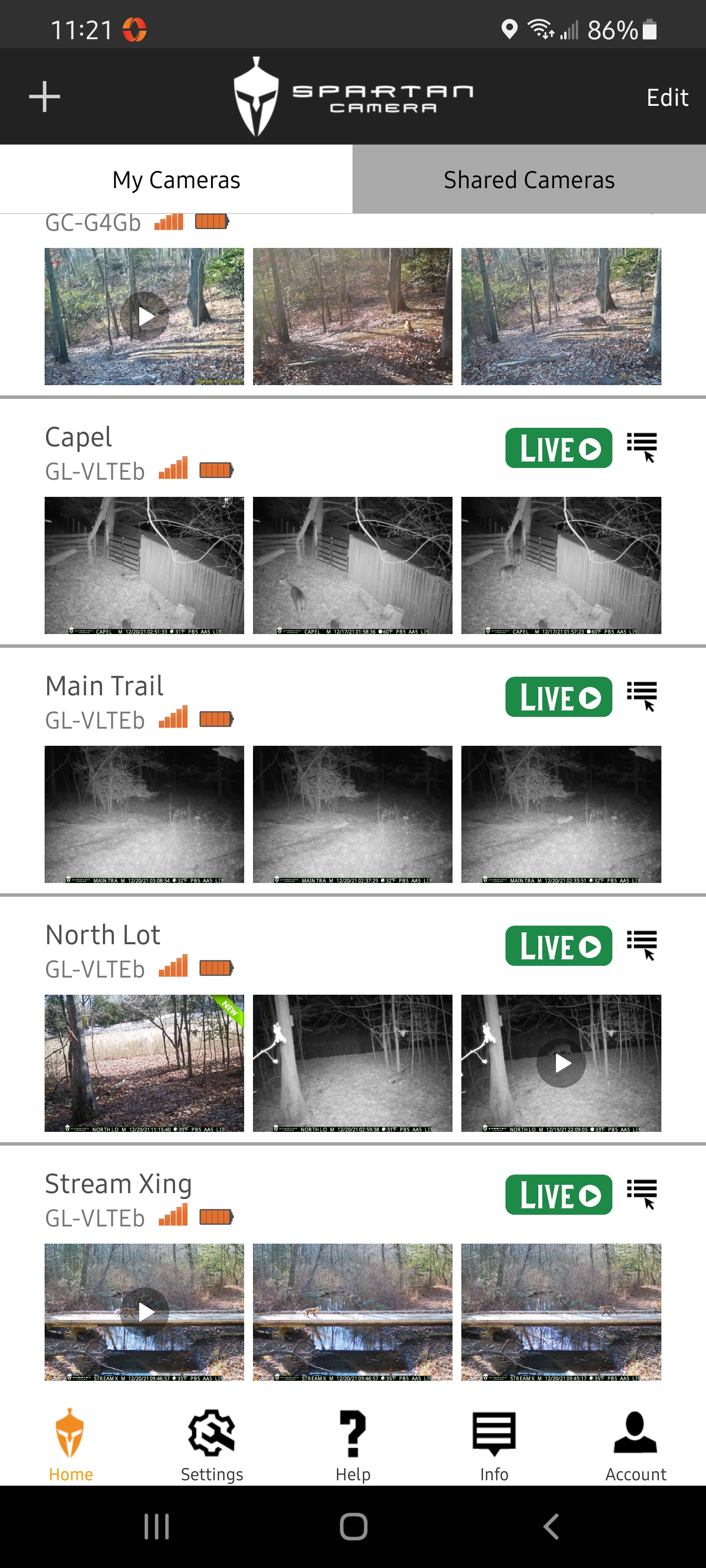
Five cameras total, all same make/model as above. I have one particular camera (just purchased) that will randomly not respond to anything. It will send a picture, but requests for video, HQ photo, or Live features will not work. If I wait an hour, sometimes two, it sometimes works.
All cameras are on solar+battery.
Batteries are 100%
Signal has full bars
Firmware is updated and same on all cameras
GoLive is Green on all cameras
SD Cards are all the same (32Gb Class 10)
Settings are same for all cameras
Sometimes after 8 or 10 attempts in a row to start Live, it will work.
Is there a way to remotely reboot the camera? Would this fix this issue possibly? Or do I need to travel back to the camera and manually reboot?
-

SD cards can cause all kinds of problems, I don't think formatting will make a difference but it can't hurt and I wouldn't be shocked if it did. Reboot and defaulting of the camera can't hurt either. If all that stuff doesn't help I would try swapping it with one of the other cameras if they are close by, that would help eliminate if it's a location/signal issue. When this camera acts up do you try the other cameras at the same time to make sure they are working fine?
-
The other cameras are all within 100yrds. They all work with no issue and at the same time this one doesn't. Signal is 100% on all cameras. I will try a new SD CARD and format it in the camera again. I will try rebooting as well. The camera has no issue taking and sending pics.. its just the requesting of stuff from the app or web page that rarely works.. If none of that works, what then?
-
4g/LTE isn't like 3g with signal strength, it can show good connection (full bars) but that doesn't mean that the camera is getting the strength/speed it needs. If swapping the SIM and the reboot and default doesn't help I would definitely try swapping locations with another camera. If the issue follows the camera to the new location I would then try swapping the antennas with with one of the others. If that still doesn't change things then you'll need to get an RMA to send it back unless support has something else think think can be done.
-
This camera is in the same spot one of the other cameras was a few months ago. I just moved it to a more active location. When the camera was here last time, it did not have amy if these issues so I am 99% sure its not a signal issue. I have Verizon service for my phone and it's speed/connection tests standing right by the camera are good. I will try the SD card, swap antennas, and reboot. After that, I guess it needs to be exchanged.
-
As of 12pm EST today, things seem to have been resolved.
I replaced the SD card and formatted it in the camera.
I rebooted the camera.
Spartan REALLY needs to add a manual reboot on either the App or Webpage, I feel it would resolve a lot of issues.
I will keep you posted over the next day or two whether it continues to function normally.
-
It seems a fresh SD card and a reboot has resolved my issue. The SD card has been in circulation with my cameras for a while, so I am certain it was the reboot that solved the issue. Luckily my cameras are relatively close to me. I think that adding a reboot option to the individual camera settings should be high priority. That and an option for longer videos.
-
Well unfortunately, the camera is back to having the same issue again. I will try another reboot tomorrow, but I have a feeling this thing will need to be exchanged. I may try swapping the antenna with another camera close by, but I am pretty sure that won't help. Is there a newer firmware I can try or anything else you can think of before starting the RMA process?
-
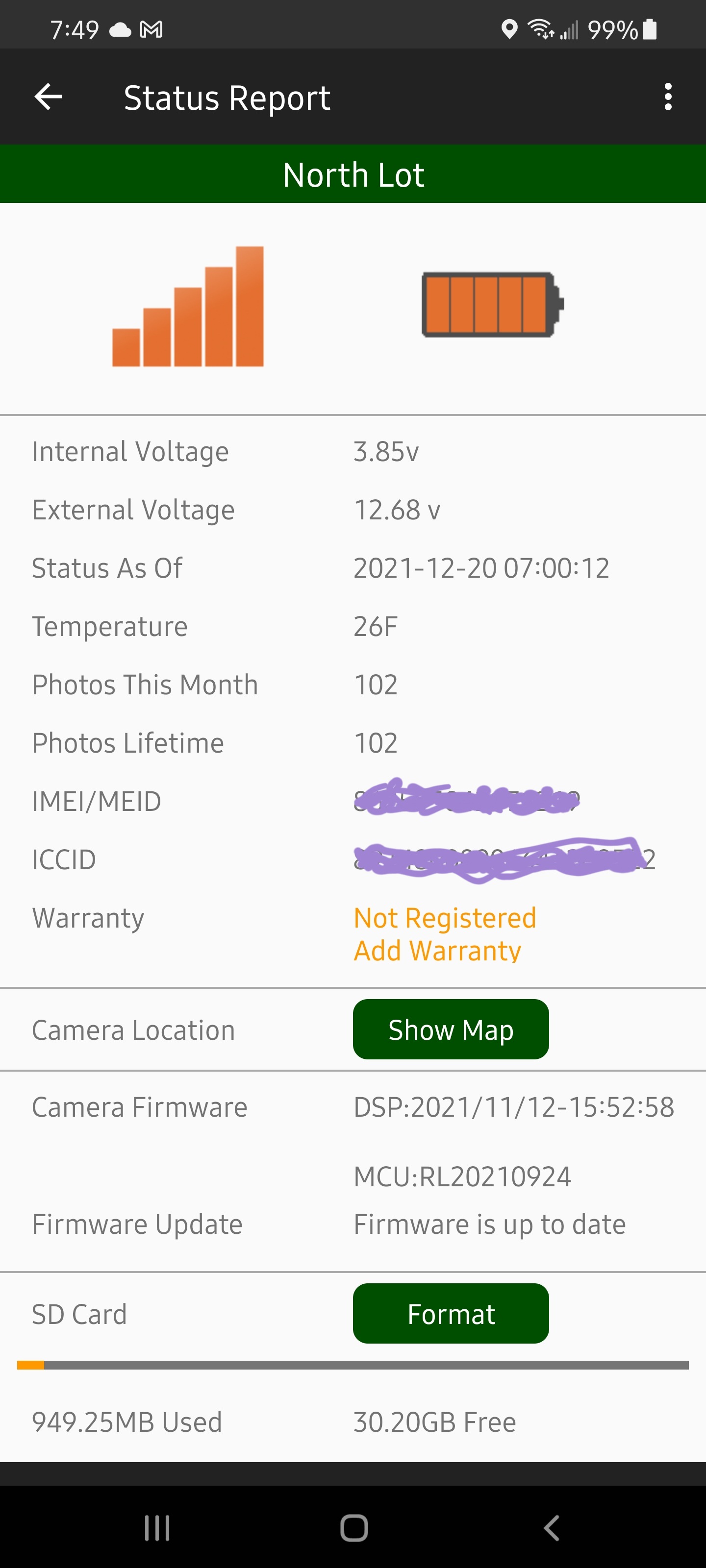
You would see a green update button on the status report screen of the app if there were a firmware update available. Can you post a screenshot of the last status report please. You may need to set your phone to desktop view in order to see the insert image icon. Make sure you include everything from the top of the report all the way to SD card info at the bottom.
-
Live Stream is Green on all Cameras.
Most requests are made when I am using WiFi, maybe a few when on LTE4g, but rarely on 5g. Requests from the web page also fail, so its not the phone or phone signal. It's not even the Camera signal because I get pics that trigger the camera immediately. The issue is the camera does not respond to remote requests, regardless of where that request comes from. A reboot seems to fix it, but only temporarily.
-
I know it's been a little while but life got in the way of my camera issues. Now I am back trying to remedy this issue again. The problem continues as stated above. I have recently found if I repeatedly request Live Stream, letting it fail multiple times, after about the 10th or 12th failure, the Green Live button will Grey out for 30 seconds. Once it come back online, Live Stream will work for a while. It's like something internally goes to sleep and only a reboot/internal reset fixes it. Should I just send this thing back for a replacement or is there something else I can try?
-

There has been a fairly recent FW update but I don’t know whether it was after your original message or not.
Do you have scheduled events set? I’ve seen one user report that having scheduled events throughout the day greatly reduced this problem (maybe because the camera checks in every 2-4 hours).
You may want to talk to support. If the camera needs to sent back, you have to talk to them anyway to get an RMA.
-
Okay, time to end the struggle with this unit. On top of the random unresponsiveness, the camera is also not reporting the voltage of the Solar/Battery correctly. All five of my cameras, including this one, are set up on a 30w solar panel and Spartan battery box with a 12v 18Ah battery. The other four have been rock solid, showing 14v - 14.2v during the day (sun) and 13v - 13.6v during the night for the past 6+ months. This particular troublesome camera, started at 12.65v and has dropped to 12.35 volts over the course of the last couple months. It doesn't fluctuate with the day/night like the others do. I tested the Solar output and it was 21v as it should be. I checked the battery itself and it read 13.1v. External voltage in the app however has never corresponded with the actual battery voltage. There is clearly something internally wrong with this camera and its time to get it replaced. Can someone tell me how to get this exchange started? Thanks.
-
Either email support@spartancamera.com or call 770-582-0004. You may need to leave voice mail. Support will be in touch.
-
Got the new camera and the the problem is still there. Annoyed I didn't try this before, but I have completely disconnected the Spartan battery box/solar panel and am letting it run for a few days on AA batteries alone. After a reboot and a few hours, the camera is still performing correctly. I am not going to get my hopes up yet, because last time it took a day or so to start acting up again after the reboot, so we will see. Not sure how the battery box could cause these issues, but after my report a few days ago about the voltages being odd, I should have tried disconnecting it before swapping cameras. Seeing as how I always have full bars, signal is not the problem. If its not the camera, and its not the signal, the only thing left is the Spartan Battery box/solar setup. I have ordered a new battery box because I don't want to disconnect one of the others, so if it continues to work correctly until this weekend, I will hook up the new battery box and see how that goes. All very strange. If it turns out to be the battery box, I wonder if Spartan will warranty that?
-
Installed the new battery box a few days ago and now it looks like everything is functioning correctly. Battery levels are correct and emulate the other 4 cameras. Very strange that the battery box would cause this, but the issues stopped when I disconnected it, and they did not reappear when I installed the new battery box. I assume there was something wrong with the voltage regulator/battery tender in the old battery box that was somehow effecting inbound communication?. All I know is now its working properly with the new Spartan Battery Box, voltages fluctuate as they should with sun exposure, and bidirectional communication is functioning correctly. I will reach out to support prior to sending my old camera back to see if they want the old battery box for inspection. I will give it a few weeks to make sure the issue does not return and report back.
Please sign in to leave a comment.
Comments
30 comments