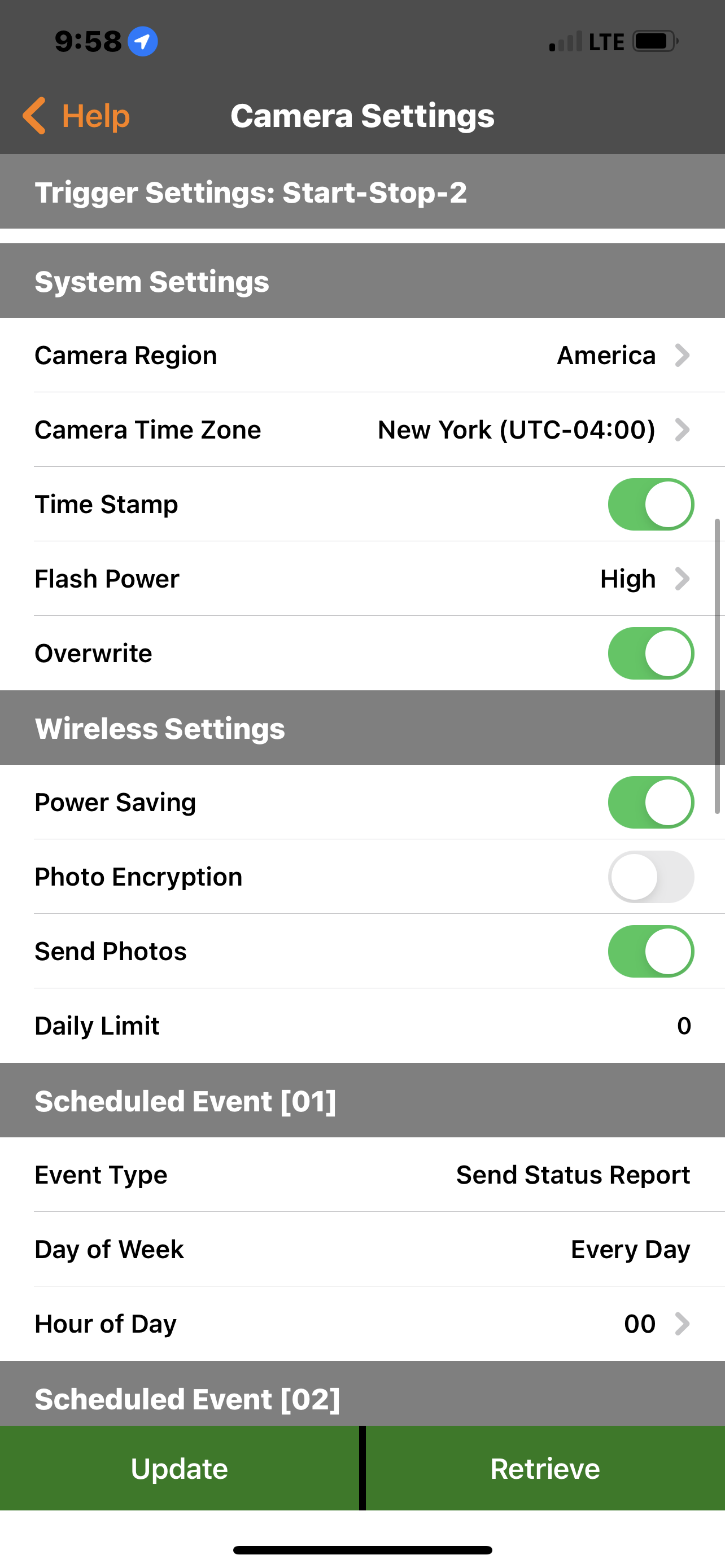
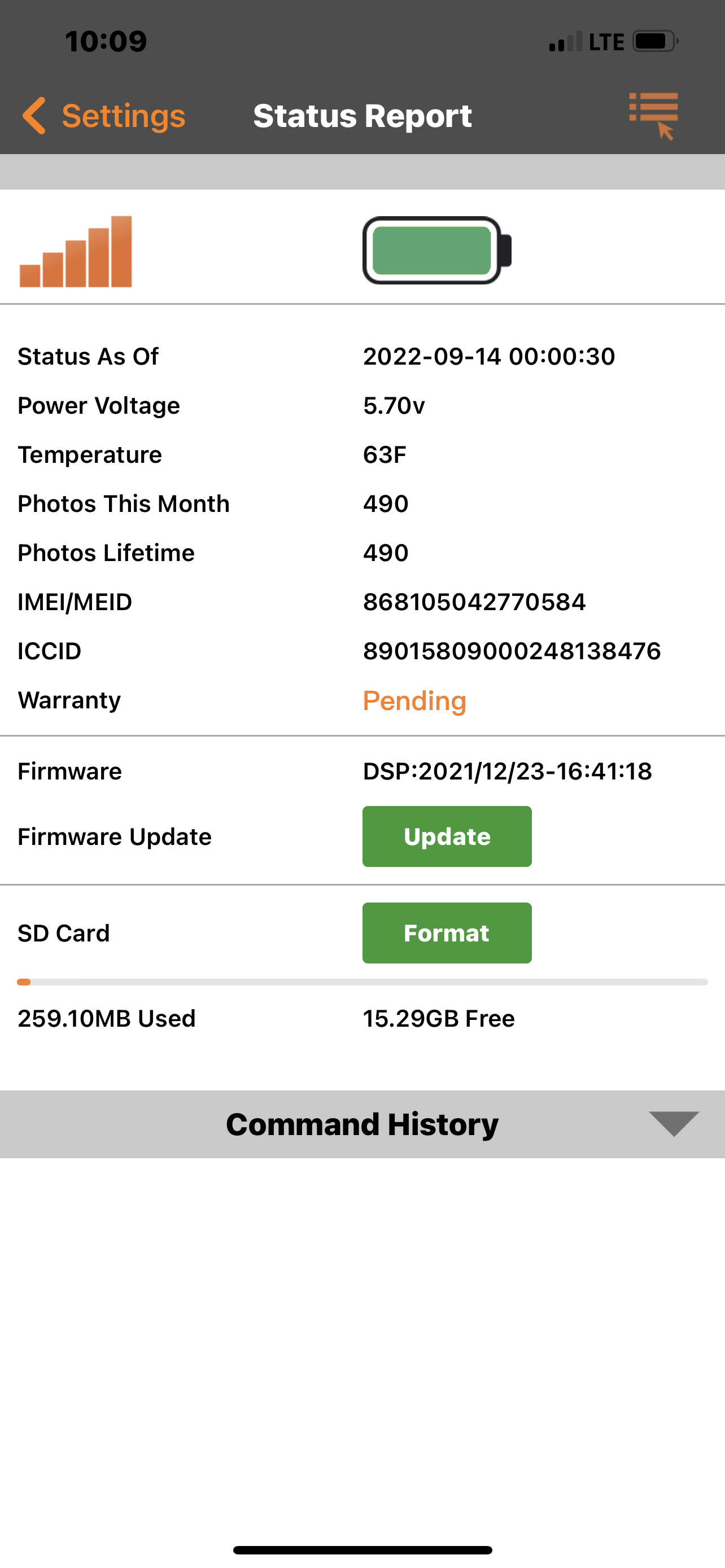
Camera settings

Comments

111 comments

  • John Lockburner

    Most likely the reason it didn't send the picture is because the card didn't format successfully. The cameras have a two year warranty so if it is a camera issue it will be taken care of.

    0
    Comment actions Permalink
  • John Lockburner

    You can format through the camera, it's an option in the menu. I would default the camera as well.

    0
    Comment actions Permalink
  • Nathan Cason

    Ok. I’ll do all that when I get to it this weekend and let you know how it goes. Thanks for your help

    0
    Comment actions Permalink
  • Elizabeth Swoope

    Sometimes cameras will work for a while with an SD card that is not "to spec", but I'm surprised your camera worked at all with a 256G SD card. Hopefully swapping out for a "to spec" card with fix the problem.

    0
    Comment actions Permalink
  • Nathan Cason

    If this does not fix my problem do I just need to send the camera back in ?

    0
    Comment actions Permalink
  • John Lockburner

    You'll have to contact support and get an RMA to send it back

    0
    Comment actions Permalink
  • Nathan Cason

    I’ve contacted support and they have given me somethings to try with the new sd card but Can u explain to me how putting a new update threw the sd card is gonna fix my problem with photos not being sent ?

    0
    Comment actions Permalink
  • Nathan Cason

    Okay now my settings that I changed are back to the way they were originally and I’m still not getting pictures

    0
    Comment actions Permalink
  • Nathan Cason

    0
    Comment actions Permalink
  • John Lockburner

    Did you update the camera itself?

    0
    Comment actions Permalink
  • Nathan Cason

    Yes I updated the camera and formatted the sd card and I haven’t gotten a picture again. The picture I sent where it says wireless settings. I turned off the send photos button. And now it’s back on to send photos. So what do I do now since everything is back to the way it was ?

    0
    Comment actions Permalink
  • John Lockburner

    Turn the camera to set up and once it finds signal press the Ok button to take a picture and then press it again to send the picture. Watch what happens and what it says on the screen.

    0
    Comment actions Permalink
  • Nathan Cason

    I am not near the camera to do that or can it be done threw the app?

    0
    Comment actions Permalink
  • Nathan Cason

    Also when I formatted my sd it was at 738 mb used and now after it was formatted it’s at 259mb used. So it’s obviously not sending pictures to me when there’s something in front of it

    0
    Comment actions Permalink
  • John Lockburner

    No that has to be done on the camera. Can you post a screen shot of the status report please?

    0
    Comment actions Permalink
  • John Lockburner

    You formatted on the camera using the menu?

    0
    Comment actions Permalink
  • Nathan Cason

    0
    Comment actions Permalink
  • Nathan Cason

    Yes I went to format in the picture I just sent u and formatted it from there. On the app basically I did it 

    0
    Comment actions Permalink
  • John Lockburner

    Your camera needs a firmware update. Cancel everything pending and request the update. Maybe with the correct SD card it will update now. Your camera checked in at midnight this morning.

    0
    Comment actions Permalink
  • Nathan Cason

    I don’t not have the new sd card in yet. It will be in this weekend if ur gets delivered on time for me to do that. I bought a sd from your company this time

    0
    Comment actions Permalink
  • Nathan Cason

    I have already done a firmware update last night but ig it didn’t do anything since it’s asking for it again

    0
    Comment actions Permalink
  • John Lockburner

    You said you updated the camera so I thought you went to it with the new SD card. Your camera isn't updated and that's most likely the problem combined with the wrong SD card. When you get the new SD card load the firmware update on it and update manually

    0
    Comment actions Permalink
  • John Lockburner

    Here's a link to the update and instructions
    https://my.spartancamera.com/download

    0
    Comment actions Permalink
  • John Lockburner

    It's not updating over the air because of the SD card incompatibly most likely

    0
    Comment actions Permalink
  • Nathan Cason

    Okay. How am I gonna load the firmware update on the sd card ?

    0
    Comment actions Permalink
  • John Lockburner

    You need a computer/laptop. The instructions are in that link I posted

    0
    Comment actions Permalink
  • Nathan Cason

    And how do I’m which one to choose ?

    0
    Comment actions Permalink
  • John Lockburner

    You want the one for your EXACT camera model. It's all in the instructions

    0
    Comment actions Permalink
  • Nathan Cason

    Okay and all Ik is I have a go cam 4g

    0
    Comment actions Permalink
  • Nathan Cason

    Is it possible to be done in a iPhone if I have a sd reader attachment for my phone ?

    0
    Comment actions Permalink

Please sign in to leave a comment.