Searching network problem

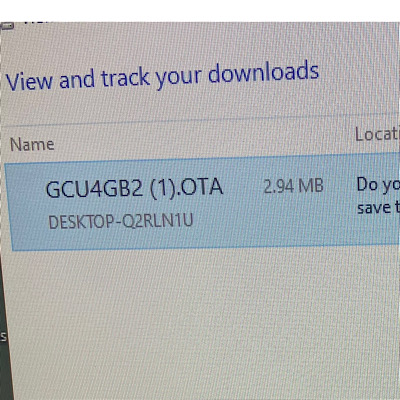
Camera just stopped working on Sept 27. Model GCU4Gb2 with US Cellular. I put in a new SIM card and 32 Gb memory card. Called US cellular and everything on their end is working fine. Tried to download updated firmware. Saved the OTA file to card and put in camera and tried to update but says file not found! Frustrating to say the least. Any help would be appreciated
-

Can you please put the SD card back in the computer, use Windows Explorer to get to the SD card so you can see the name of the file on the card, then take a picture of it and post that here? Usually file not found is either because the file is not there, it’s the wrong file (FW for a different model camera), or the file doesn’t have the correct file name because it’s been downloaded more than once and Windows adds extra characters that the camera doesn’t recognize.
Please make sure that the file name is readable. We don’t need to see the whole computer screen.
https://support.spartancamera.com/hc/en-us/articles/360041970993-How-to-post-pictures-screenshots-from-your-phone-to-the-Support-Forum

Please sign in to leave a comment.
Comments
6 comments